
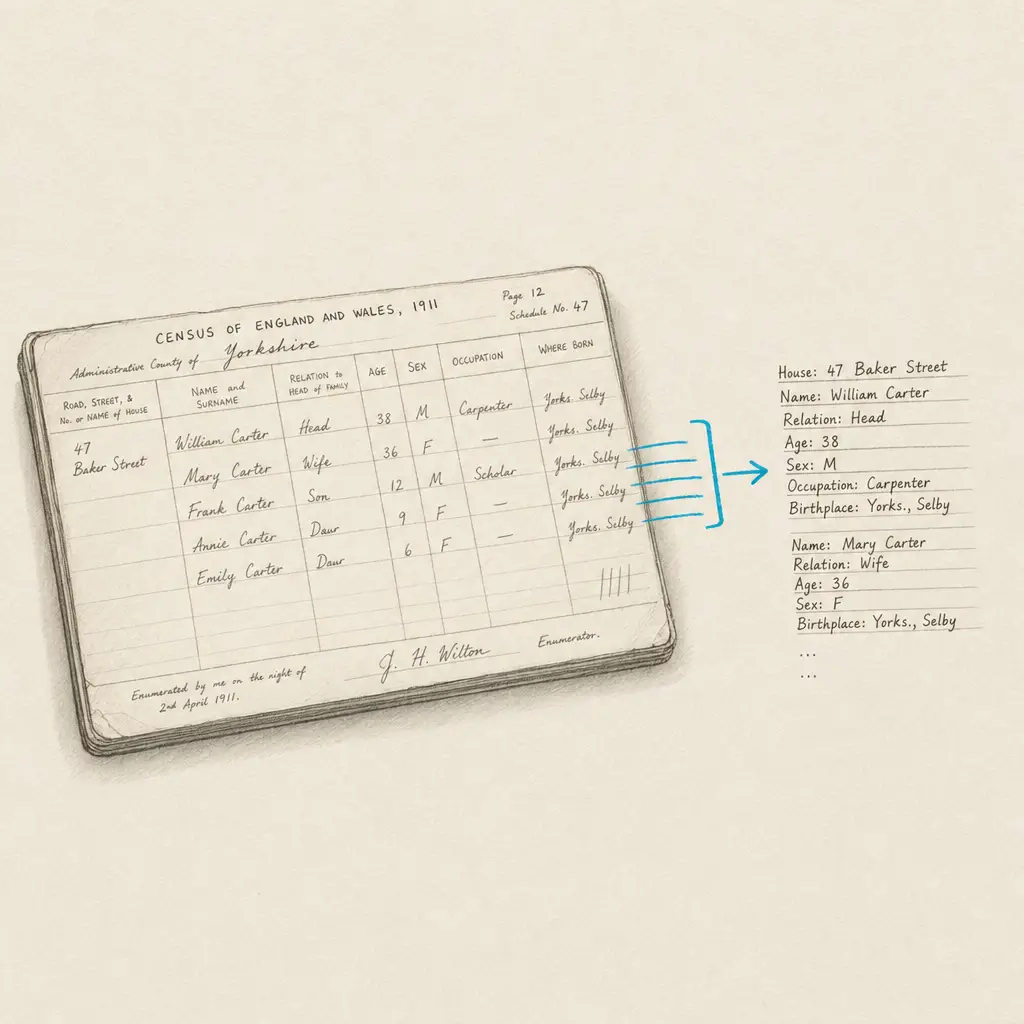
Quick Takeaways
- Handwriting OCR can process census pages from different decades, handling various enumerator handwriting styles and historical record formats
- It converts handwritten household entries, names, ages, occupations, and relationships into searchable text for faster research
- Produces editable output that you can search across multiple census years, copy into research databases, and organize systematically
- Works with scanned images from FamilySearch, Ancestry, archives, or personal microfilm scans without requiring format conversion
- Manual verification is still important for names and places, but the technology accelerates the process of making census data accessible
Census research forms the backbone of genealogical investigation. These population surveys document where families lived, who resided in each household, their ages, occupations, birthplaces, and relationships. For family historians, census records provide crucial evidence for tracking families across decades, identifying previously unknown relatives, and establishing residence patterns.
But finding your ancestors in census records often means manually reviewing hundreds of pages. Most genealogists know the experience of scrolling through enumeration district after enumeration district, checking each household for familiar surnames, verifying ages and birthplaces, and hoping not to miss the entry that proves where your family lived in a particular census year.
Even when census records are digitized and available through platforms like FamilySearch, Ancestry, or national archives, they’re typically available only as scanned images. You can view them, but you can’t search within the handwritten text itself. Existing indexes help, but they’re incomplete, sometimes contain errors, and may not capture the exact spelling variations you need to find. When working with unindexed censuses or verifying questionable index entries, you’re back to manual page-by-page review.
This creates research friction that every census researcher recognizes. You spend hours visually scanning enumeration pages. You manually transcribe household information into spreadsheets or research logs. You can’t quickly search your collected census images for all mentions of a particular surname or birthplace because the handwritten text isn’t searchable.
This page explains what handwriting OCR can and cannot do for census research. It’s not about replacing careful source analysis or eliminating the need to verify information. It’s about understanding whether this type of tool can accelerate the mechanical work of extracting text from census images so you can spend more time on genealogical analysis and less time on manual transcription.
Why Census Records Present OCR Challenges
Historical census records were created by enumerators visiting households and recording information by hand. This process created documents with characteristics that make automated text extraction challenging.
Census handwriting varies by enumerator, time period, and circumstances. Some enumerators wrote carefully and legibly, producing neat entries that are easy to read 150 years later. Others rushed through hundreds of households, creating entries where letters blur together and abbreviations are cryptic. A single enumeration district might have been completed by multiple enumerators as work was redistributed, meaning handwriting style changes partway through.
Different census years used different schedules and formats. The 1850 U.S. census included basic household information but didn’t record relationships between household members. The 1880 census added relationship columns and asked about parents’ birthplaces. The 1900 census introduced new questions about immigration and naturalization. Each format change altered what enumerators recorded and how they organized information on the page.
Microfilm preservation introduced additional challenges. Many researchers work with census records that were microfilmed for preservation in the mid-20th century. These microfilm copies introduced grain, contrast variations, and sometimes blurring that degrades the clarity of the original handwriting. Digital scans of microfilm inherit these quality issues.
Historical cursive styles compound the problem. Census enumerators in the 1800s and early 1900s used the flowing cursive penmanship taught in that era. Letters connect in ways that make individual character recognition difficult. Capital letters use flourishes. The letter “s” might look like “f” to modern eyes. Place names and occupations are abbreviated in ways that vary by enumerator.
Characteristics that make census OCR challenging:
- Variable enumerator handwriting: Different individuals with different handwriting quality and styles within a single census
- Historical cursive penmanship: Flowing connected writing styles from different eras (Spencerian, Palmer Method, etc.)
- Abbreviations and conventions: Enumerator-specific shorthand for occupations, relationships, and places
- Column-based layouts: Information organized in columns that must maintain structure during text extraction
- Microfilm degradation: Grain, contrast issues, and quality loss from preservation copying
- Marginal notes and corrections: Annotations, crossed-out entries, and enumeration district boundary notes
- Name spelling variations: Surnames spelled phonetically or inconsistently across different census years
What Handwriting OCR Can Extract from Census Records
Handwriting recognition technology designed for historical documents approaches census records differently than standard OCR. It’s built to handle the variable handwriting, historical formats, and preservation challenges typical of actual census research.
Household Entry Information
The core value of census OCR is extracting the text from household entries so it becomes searchable and editable. Instead of looking at a census page as a fixed image, you get the actual text: names, ages, occupations, birthplaces, relationships, and other recorded details.
This means you can search extracted census text for all instances of a surname, locate every household with members born in a specific location, or find occupations matching particular keywords. You can copy household information directly into genealogy software or spreadsheets without manual retyping.
The technology preserves column structure where possible, maintaining the relationship between column headers and the data beneath them. This helps preserve context during extraction.
Multiple Handwriting Styles
Census pages typically contain entries from a single enumerator, but enumeration districts were sometimes divided and completed by different hands. Handwriting OCR processes these variations by analyzing each section based on its own characteristics rather than expecting uniform style throughout the page.
This adaptability matters when working with enumeration districts that span multiple pages or when boundary changes resulted in different enumerators working adjacent areas.
Historical Census Formats
Different census years used different schedules with varying numbers of columns and types of information recorded. Handwriting OCR handles these format variations, processing everything from the simpler schedules of early censuses to the more detailed questionnaires of later years.
Whether you’re working with the free schedule of the 1850 census, the detailed household questions of 1900, or the family relationship data in 1880, the technology adapts to the structure of each census format.
Degraded and Microfilm Sources
Census researchers often work with less-than-perfect source material. Original records may have faded ink. Microfilm copies introduce grain and contrast issues. Archive scans vary in quality depending on when and how they were created.
Handwriting OCR is designed to extract text from these real-world sources. While severely degraded sections will always present challenges, the technology can process census images that standard OCR would reject as too poor quality.
What to Expect: Accuracy and Limitations
Understanding what handwriting OCR handles well and where it needs verification helps set realistic expectations for census research applications. This isn’t technology that eliminates the need for source verification. It’s a tool that accelerates text extraction so you can focus on genealogical analysis.
The table below shows typical performance with different census elements:
| Census Element | What Works Well | What Requires Verification |
|---|---|---|
| Names | Common surnames, repeated family names across households | Unusual surname spellings, phonetic renderings, names in non-English origins |
| Ages | Clearly written numerical ages | Ages that changed unexpectedly between census years (verify against other records) |
| Birthplaces | Standard state/country names, repeated location entries | Variant place name spellings, obsolete place names, foreign locations with unfamiliar spelling |
| Occupations | Common occupation names that repeat across households | Heavily abbreviated occupations, specialized trade terms, obsolete occupation names |
| Relationships | Standard relationship terms (wife, son, daughter, etc.) | Abbreviated or unclear relationship designations, complex household relationships |
| Addresses | Street names and house numbers | Rural route descriptions, unclear enumeration district boundaries |
What Handwriting OCR Handles Well
Standard household information that repeats across entries processes reliably. When an enumerator recorded dozens of households with similar information structure, the repetition helps the technology recognize patterns. Names, ages, and birthplaces that appear multiple times in different households benefit from this pattern recognition.
Clearly written entries from enumerators with legible handwriting produce accurate extractions. Some census pages are simply easier to read than others, and when the source handwriting is clear, the extracted text quality reflects that clarity.
Complete census pages with standard formatting extract more reliably than partial pages or sections with unusual annotations. When the census schedule structure is intact and the enumerator followed standard recording practices, the output maintains that structure.
What Requires Manual Verification
Name spellings benefit from researcher verification, especially for surnames. Census enumerators often spelled names phonetically as they heard them, meaning your ancestor’s surname might appear differently across census years. The OCR will extract what’s actually written, but you’ll need to apply genealogical judgment about whether “Schmidt” and “Schmitt” refer to the same family.
Birthplace variations need contextual interpretation. Historical place names changed over time, and enumerators recorded them with varying specificity. A birthplace listed as “Germany” in one census and “Prussia” in another might refer to the same location, but the researcher must make that determination based on historical geography.
Unusual abbreviations or enumerator-specific shorthand may not expand automatically. If an enumerator consistently abbreviated “laborer” as “lab” or used local shorthand for occupation names, the extracted text will preserve those abbreviations as written.
Marginal notes, corrections, and crossed-out entries require careful review. Census pages often contain enumerator corrections, boundary notes, or annotations added during later reviews. These elements may be extracted along with the main household entries and need to be identified during verification.
The goal is acceleration, not automation. Handwriting OCR handles the mechanical task of text extraction from census images. Researchers apply their expertise to verify accuracy, interpret variant spellings, and make genealogical determinations based on the extracted information.
How Census Researchers Use Handwriting OCR
Handwriting OCR addresses specific bottlenecks in census research workflows. It’s not a replacement for careful source analysis or genealogical reasoning. It’s a tool for removing friction from the process of extracting and organizing census information.
Common census research applications:
Systematic Enumeration District Review
When you need to review entire enumeration districts looking for a family that might appear under variant spellings or unfamiliar household arrangements, handwriting OCR converts the entire enumeration district to searchable text. Instead of visually scanning every household, you can search the extracted text for surname variations, birthplace keywords, or occupation patterns.
This is particularly valuable when working with unindexed censuses where no existing index guides you to relevant pages. You can process complete enumeration districts and then search systematically rather than relying on visual page-by-page review.
Multi-Census Timeline Building
Tracking a family across multiple census years requires extracting information from each census and organizing it chronologically. Rather than manually transcribing household information from the 1850, 1860, 1870, 1880, and 1900 censuses, you can process each census page and extract the relevant text directly.
This accelerates the process of building family timelines, identifying when children were born between census years, tracking occupation changes, and documenting residence patterns across decades.
Verifying Index Entries
Existing census indexes sometimes contain transcription errors or miss entries entirely. When you find a census index entry that doesn’t quite match your known family information, processing the actual census page gives you searchable text to verify the indexed information against the handwritten original.
You can search the extracted text for surname variations the index might have missed, check birthdates and birthplaces for accuracy, and identify household members who might have been omitted from index records.
Cluster Research and FAN Club Analysis
Genealogists often track not just their direct ancestors but also friends, associates, and neighbors (the FAN club) who appear near them in census records. Processing enumeration districts gives you searchable text containing all the households near your ancestor’s family.
You can search for surnames of known associates, identify neighbors who moved with your family to new locations, and spot relationships between households that might indicate family connections not immediately obvious from a single household entry.
Building Research Databases
Many genealogists maintain personal databases or spreadsheets organizing census information across their entire family tree. Handwriting OCR accelerates database building by providing editable text that can be copied directly into research management systems.
Instead of typing each household member’s information manually, you can extract the text, verify it for accuracy, and paste it into your database structure. This reduces data entry time and minimizes transcription errors introduced during manual typing.
Creating Searchable Archives
When you’ve collected census images for an entire family line or community across multiple decades, processing them creates a searchable personal archive. You can then search your entire collection for specific surnames, locations, or occupations rather than remembering which census year or enumeration district contains the information you need.
This is particularly valuable for researchers working on one-name studies, community history projects, or comprehensive family reconstructions that involve hundreds of census households.
Integration with Census Research Workflows
Handwriting OCR fits into existing census research workflows as a text extraction tool rather than replacing established genealogical practices. Understanding where it fits helps determine whether it addresses bottlenecks you actually experience.
Typical workflow integration:
- Locate census records using existing indexes, digital archives, or manual browsing
- Download or save census page images from FamilySearch, Ancestry, archives, or microfilm scans
- Process census images through handwriting OCR to extract text
- Verify extracted information against the original images, checking names, dates, and places
- Copy verified data into genealogy software, spreadsheets, or research databases
- Search extracted text for surnames, locations, or household patterns across multiple census pages
- Cite sources properly in your research, referencing the original census images not the extracted text
The technology handles step 3, accelerating text extraction. The other steps remain researcher work that requires genealogical knowledge and careful source analysis.
For researchers working extensively with unindexed censuses, the time savings can be substantial. Instead of manually transcribing hundreds of households, you extract the text and spend your time on verification and analysis.
For researchers who primarily use well-indexed censuses, the value is more situational. When you encounter index errors, need to verify questionable entries, or want to analyze complete enumeration districts rather than isolated households, handwriting OCR provides capabilities you wouldn’t otherwise have without extensive manual transcription.
Getting Started with Census OCR
If you’re working with census records and wondering whether handwriting OCR would accelerate your research, the most direct approach is to test it with actual census pages from your current research.
Census handwriting varies by country, time period, and individual enumerator. A U.S. 1900 census page from a rural enumeration district looks different from an 1881 England census from an urban area. The only way to know if handwriting OCR will help with your specific census research is to try it with the kinds of census pages you actually work with.
Handwriting OCR offers a free trial with credits you can use to process sample census pages. Download a census page you’ve been meaning to transcribe, a section from an unindexed enumeration district, or a page where you want to verify index accuracy. Process it and compare the extracted text to what you’d get from manual transcription.
Your census images remain private throughout this process. They’re processed only to deliver results to you and are not used to train models or shared with anyone else. Family history documents often contain personal information, and privacy is built into the service design.
The process is straightforward. Upload your census page image or PDF, process it, and download the results as editable text in formats that work with your research workflow (Word, Markdown, plain text, or structured data formats). There’s no software installation, no technical setup, and no commitment required to test whether it works for your census documents.
If it saves you time on the census pages you tested, it will likely save time on similar materials in your research. If it doesn’t meet your accuracy needs for specific census years or enumerator handwriting styles, you’ve learned that before investing further. Either way, you’ll have a clearer understanding of where handwriting OCR fits in census research workflows.
For broader context on how handwriting OCR works across different genealogical document types beyond census records, see our main page on genealogy and family history handwriting OCR.
Frequently asked questions
Can handwriting OCR accurately read census records from different decades like the 1850, 1880, or 1900 censuses?
Yes. Handwriting OCR is designed to process historical census records from different time periods, handling the various cursive styles and formatting conventions used across different census years. Each decade's census used different schedules and formats, and enumerators wrote in the penmanship styles typical of their era. The technology adapts to these variations. Accuracy depends on the individual enumerator's handwriting quality and the condition of the census image you're working with. The best way to assess performance on census pages from your specific research time period is to test with sample pages from the census years you're actively researching.
Will handwriting OCR work with census images downloaded from FamilySearch, Ancestry, or other genealogy websites?
Yes. Handwriting OCR processes census images regardless of their source. If you can download a census page image from FamilySearch, Ancestry, The National Archives, or other digital archives, you can process it. The system handles various image qualities and formats, including downloads from genealogy platforms, scans from microfilm, or photographs of census pages from archive visits. No format conversion or special preparation is required before processing.
How does handwriting OCR handle surnames that were spelled differently across different census years?
Handwriting OCR extracts the surname spelling as it actually appears in each census. If your ancestor's surname was spelled "Schmidt" in 1870 and "Schmitt" in 1880, the system will extract each spelling exactly as written. This is actually valuable for census research because it preserves the historical spelling variations that genealogists need to track. However, you'll need to apply your own research judgment about whether different spellings refer to the same family. The technology handles text extraction; genealogical interpretation remains researcher work.
Can I use handwriting OCR to make entire enumeration districts searchable for cluster research?
Yes. Many census researchers use handwriting OCR specifically for this purpose. By processing complete enumeration districts, you create searchable text that you can search for surnames of associates, neighbors who moved with your family, and household patterns that might indicate family relationships. This is particularly valuable for FAN club research (Friends, Associates, and Neighbors) where you're tracking not just your direct ancestors but also the people who appear near them in census records. Instead of visually reviewing every household, you can search the extracted text for relevant surnames and locations.
Does using handwriting OCR mean my census research images are sent to third parties or used to train AI models?
No. Your census images remain private and are processed only to deliver results to you. They are not used to train AI models, not shared with third parties, and not retained longer than necessary to complete processing. This is particularly important for family history research that may contain personal information about living relatives who appear in recent census records. Privacy is built into the service design as a fundamental principle, not an optional feature.