
Quick Takeaways
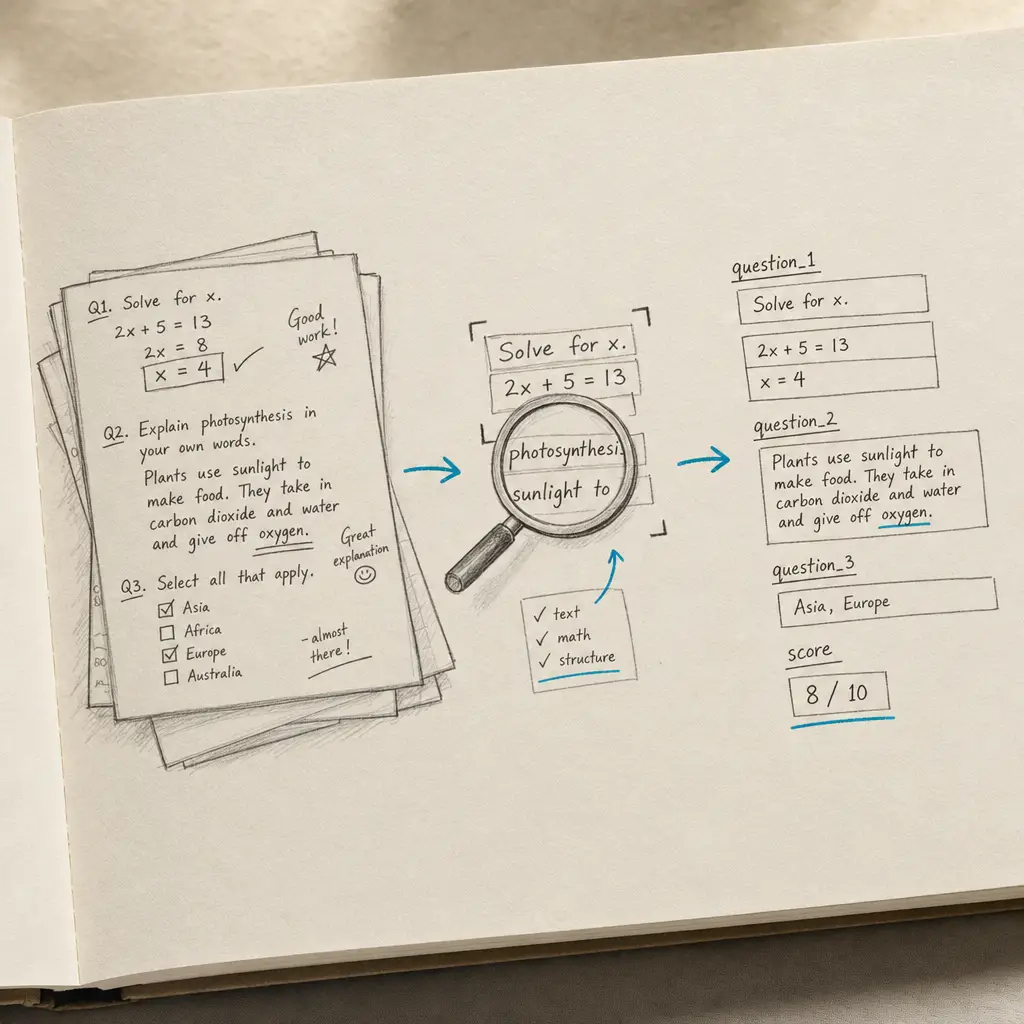
- Handwriting OCR processes handwritten homework, essays, and assessments to create searchable, editable text
- It’s designed to handle variable student handwriting quality, from neat cursive to rushed exam answers
- Produces digital text that can be integrated with grading systems, plagiarism checkers, and feedback tools
- Works with scanned assignments and photos without requiring special formatting
- Enables digital archiving of student work while maintaining original content
- Best used as part of grading workflows, not as a replacement for reading student work
Student assignments still appear on paper, despite widespread digital learning tools. Some students think better with pen and paper. Others submit handwritten work because they lack reliable device access. Assessments in mathematics, sciences, and foreign languages often require handwritten notation that’s difficult to reproduce digitally.
This creates challenges for educators. Handwritten assignments can’t be searched for specific content. Providing detailed feedback means writing on paper or typing comments separately. Detecting patterns across student work requires reading through physical papers. When teachers want to archive exemplary work or track student progress over time, handwritten assignments remain static images.
This page explains what handwriting OCR can and cannot do for student assignments. It’s not about automating grading or eliminating the need to read student work. It’s about understanding whether this tool is relevant to your teaching workflow, what realistic expectations look like, and where it might reduce friction in processes you already use.
Why Students Still Submit Handwritten Work
Despite the prevalence of laptops and tablets in education, handwritten assignments continue to appear across all grade levels and subjects. This isn’t simply a matter of resistance to technology or lack of resources.
Research on learning and cognition suggests that handwriting activates different cognitive processes than typing. Students who take notes by hand often demonstrate better conceptual understanding and retention than those who type. Writing by hand requires more active processing of information, which can deepen learning.
Certain subjects practically require handwritten work. Mathematics assignments involve equations, diagrams, and notation that are cumbersome to produce digitally. Science lab reports contain hand-drawn observations, sketches, and calculations. Foreign language assignments benefit from the motor memory developed through handwriting practice.
Assessment contexts often necessitate handwritten responses. Standardized tests, in-class essays, and timed exams typically use paper and pencil to ensure equity and prevent unauthorized assistance. Teachers need to evaluate this work just as thoroughly as typed assignments, but the handwritten format creates additional processing challenges.
Access and equity considerations also play a role. Not all students have reliable access to devices outside school hours. Requiring digital submission can create barriers for students who depend on shared family computers or inconsistent internet access. Accepting handwritten work ensures all students can complete assignments.
Common types of handwritten student assignments:
- Essays and writing assignments: Timed essays, in-class writing, and drafts that students compose by hand before typing final versions
- Mathematics problem sets: Homework showing work for calculations, proofs, and multi-step problems requiring handwritten notation
- Science lab reports: Observations, data tables, calculations, and hand-drawn diagrams documenting experimental results
- Foreign language practice: Vocabulary exercises, grammar drills, and composition practice where handwriting reinforces learning
- Assessment responses: Test answers, exam essays, and short-answer questions completed under supervision
- Creative projects: Illustrated stories, annotated drawings, and interdisciplinary work combining text and visual elements
Why Standard Scanning Isn’t Enough
Teachers already scan or photograph student assignments for digital archiving. Schools create PDFs of student work for portfolios. Parents receive scanned copies of graded assignments. But scanning creates images, not text.
Static images can’t be searched for content. If you want to find all students who mentioned a specific concept or made a particular type of error, you must read through every assignment manually. This is impractical when reviewing work from multiple classes or tracking patterns over time.
Standard OCR technology handles printed text but fails on handwriting. When teachers try to run regular OCR on handwritten assignments, the results are typically unusable. Characters are misread, words are skipped, and the resulting text requires so much correction that manual transcription would be faster.
This limitation prevents several valuable workflows. Teachers can’t efficiently check handwritten work for plagiarism because plagiarism detection tools require text input. Providing detailed typed feedback means manually transcribing student responses. Creating searchable archives of exemplary student work isn’t possible when assignments remain as images.
The pedagogical implications are significant. When student work isn’t easily searchable, teachers miss opportunities to identify widespread misconceptions, track conceptual development over time, or share strong examples with future classes. The effort required to make handwritten work accessible for these purposes often exceeds what’s practical given teaching workloads.
What Handwriting OCR Is Built to Handle
Handwriting recognition technology designed specifically for variable handwriting approaches student assignments differently. Rather than expecting uniform letter shapes, it’s trained to recognize patterns across diverse writing styles, ages, and skill levels.
Variable Student Handwriting Quality
Student handwriting varies dramatically. Elementary students are still developing letter formation. Middle school students often switch between print and cursive mid-sentence. High school students rushing through timed exams sacrifice legibility for speed. Adult learners bring handwriting habits formed decades ago.
Handwriting OCR is designed to work with this variability. It processes assignments where letter consistency changes throughout the page. It handles cursive, print, and mixed styles. It adapts to different writing instruments, from pencil to pen, and different paper types, from lined notebook paper to blank test booklets.
This doesn’t mean it reads every student’s handwriting perfectly. Extremely stylized writing or severe sloppiness will still present challenges. But it’s built to handle the range of real-world student handwriting that educators encounter, not just carefully practiced examples.
Mixed Content Assignments
Many student assignments combine multiple types of content on the same page. A mathematics problem set includes typed questions with handwritten solutions. A science lab report contains printed instructions with handwritten observations. A language arts assignment shows a printed passage with handwritten annotations.
Standard OCR struggles with this combination. It may process printed text adequately but fail on handwritten portions, or it may become confused by mixed formats and produce errors in both.
Handwriting OCR handles mixed content by recognizing printed text, handwritten text, and even diagrams or drawings on the same page. It preserves the document structure so you can see how students responded to specific prompts or how they organized their work.
Scanned and Photographed Assignments
Teachers collect student work in various formats. Some schools have document scanners. Others rely on smartphone cameras. Quality varies from high-resolution scans to photos taken under classroom lighting conditions.
Handwriting OCR processes scanned PDFs and images without requiring special formatting. You don’t need professional scanning equipment or specific camera settings. The system handles variations in image quality and adapts to different document conditions, from crisp scans to photos with slight shadows or angles.
This matters for workflow efficiency. When you’re grading a stack of assignments, the last thing you need is additional technical steps. The tool works with the scans or photos you already create.
What to Expect: Capabilities and Limitations
Understanding what handwriting OCR can and cannot do with student assignments helps set realistic expectations. This isn’t technology that eliminates the need to read student work. It’s a tool designed to accelerate specific parts of teaching workflows while preserving the pedagogical relationship between teacher and student.
The table below shows typical performance across common assignment types:
| Assignment Type | What Works Well | What May Need Review |
|---|---|---|
| Essays and paragraphs | Full text extraction, preserves paragraph structure | Creative spelling from younger students, unconventional abbreviations |
| Math problem sets | Handwritten numbers, basic notation, multi-step work | Complex equations, specialized symbols, student-invented notation |
| Short answer responses | Complete sentences, bullet points, brief explanations | Very rushed handwriting from timed assessments, severe sloppiness |
| Lab reports and observations | Data tables, measurements, procedural notes | Hand-drawn diagrams with integrated text labels, chemical structures |
| Foreign language practice | Standard alphabet characters, common diacritical marks | Less common accent marks, student errors in letter formation |
What It Handles Well
Handwriting OCR converts handwritten student work into editable, searchable text. This means you can search across multiple assignments for specific terms or concepts. You can copy student responses into grading rubrics or feedback documents. You can check handwritten work for plagiarism using standard detection tools.
It processes scanned PDFs and photos without requiring format conversion or technical setup. Scan an assignment or take a photo with your phone, upload it, and the system processes it. No preprocessing steps, no file conversions, no software installation.
Document structure and formatting are maintained where possible. Paragraphs remain paragraphs. Numbered responses stay in sequence. This preservation of structure matters when evaluating how students organize their thinking or follow assignment instructions.
What Requires Teacher Review
Student errors and unconventional responses need human interpretation. If a student spells a word incorrectly or uses abbreviations specific to their peer group, the system captures what they wrote but doesn’t correct it. A teacher reviewing the output will recognize student errors for what they are.
Subject-specific notation may require verification. Mathematical equations with complex fractions, chemistry notation with subscripts and superscripts, or music notation with staff lines all present additional complexity. The system handles many cases well, but specialized content benefits from teacher review.
Very rushed or extremely sloppy handwriting has limits. If a student’s handwriting during a timed exam becomes illegible to human readers, OCR will struggle similarly. These assignments still benefit from processing, but they’ll require more careful review of the output.
The goal is not to eliminate reading student work. The goal is to transform handwritten assignments into a format that supports efficient searching, feedback provision, plagiarism checking, and archiving while teachers maintain their role as the primary readers and evaluators of student learning.
Where This Fits in Teaching Workflows
Handwriting OCR addresses specific bottlenecks in teaching workflows. It’s not a replacement for reading student work or providing feedback. It’s a tool for removing friction from processes that currently require extensive manual work.
How educators use handwriting OCR for student assignments:
-
Digital feedback provision: Converting handwritten assignments to text enables teachers to provide typed feedback using word processing comments or feedback tools integrated with learning management systems. Rather than writing comments on paper or typing summaries separately, teachers can work directly with digital versions of student submissions. This is particularly valuable for detailed feedback on handwritten essays and writing assignments where typed comments are clearer than handwritten marginalia.
-
Plagiarism detection: Making handwritten work searchable enables teachers to check student writing against online sources or previous submissions. While plagiarism detection on typed work is standard practice, handwritten assignments typically escape this scrutiny simply because they’re not in a format plagiarism checkers accept. Converting handwritten work to text ensures all student submissions receive equivalent review.
-
Pattern analysis across classes: Digitizing student responses makes it possible to search for common misconceptions, frequently missed concepts, or widespread errors. When teaching multiple sections of the same course, identifying patterns helps teachers adjust instruction. Rather than remembering patterns from reading dozens of papers, teachers can search digital versions for specific terms or concepts.
-
Portfolio and exemplar archiving: Creating searchable archives of strong student work supports future instruction. Teachers who want to show exemplary responses, track individual student growth over time, or build collections of instructional examples benefit from searchable digital versions. Handwritten work that remains as static images is difficult to organize and retrieve when needed.
-
Accommodation and accessibility: Converting handwritten assignments to digital text supports students with reading difficulties or visual impairments who need to access peer work. It also helps English language learners who might benefit from translation tools or vocabulary support when reviewing sample assignments.
-
Assessment data tracking: Extracting text from handwritten responses enables quantitative analysis of student writing, such as word counts, vocabulary usage, or response patterns. This data can inform instructional decisions or support research on student learning.
The common thread across these uses is workflow enhancement rather than automation. The technology handles mechanical conversion tasks. Teachers apply their expertise to reading student work, providing meaningful feedback, and making instructional decisions that require professional judgment.
Privacy and Student Data Considerations
When processing student assignments through any digital tool, privacy and data protection are not optional concerns. Student work contains sensitive information and is protected by regulations like FERPA in the United States.
Handwriting OCR services designed for educational use should process student documents only to deliver results to the educator. Student work should not be used to train AI models, should not be shared with third parties, and should not be retained longer than necessary to complete processing.
This means when you upload a student assignment, it’s processed to extract text and deliver that text back to you. The original document and the extracted text are not used for any other purpose. They’re not added to training datasets. They’re not analyzed for purposes beyond the OCR conversion you requested.
Educators should verify these privacy practices before processing student work through any service. The questions to ask are straightforward: Where does student data go? How long is it retained? Who has access to it? What is it used for beyond the service you requested?
For educational contexts, the acceptable answer is that student data is processed only to provide the requested service, retained only as long as necessary to deliver results, accessible only to the educator who submitted it, and used for no purpose beyond OCR conversion.
Getting Started
If you’re dealing with handwritten student assignments and wondering whether this type of tool is relevant to your teaching workflow, the most direct approach is to test it with actual student work.
Student handwriting varies by age, subject, and individual. What works well for high school essays might perform differently on elementary math homework. The only way to know if handwriting OCR will support your specific teaching context is to try it with the kinds of assignments you actually receive.
Handwriting OCR offers a free trial with credits you can use to process sample assignments. Upload a handwritten essay, a math problem set, or a lab report with observations and diagrams. See how the output compares to what you’d get from manual transcription or other tools you’ve tried.
Student work remains private throughout this process. Assignments are processed only to deliver results to you and are not used for any other purpose. This matters particularly in educational contexts where student privacy is legally protected.
The service is designed to be straightforward. Upload scanned assignments or photos, process them, and download the results as editable text in formats compatible with word processors and learning management systems. There’s no complex setup, no software installation, and no commitment required to test whether it works for your students’ assignments.
If it saves you time on the assignments you tested, it will likely save time on similar work from your students. If it doesn’t meet your accuracy requirements for your grade level or subject area, you’ve learned that before investing further. Either way, you’ll have a clearer understanding of where handwriting OCR fits in educational workflows.
Frequently asked questions
Can handwriting OCR process assignments from elementary school students who are still developing handwriting skills?
Yes, handwriting OCR is designed to handle variable handwriting quality, including writing from younger students who are still developing letter formation skills. The system processes both print and cursive, mixed styles, and inconsistent letter shapes common in elementary writing. However, accuracy depends on legibility. If a student's handwriting is difficult for a human teacher to read, OCR will face similar challenges. The best way to assess performance for your grade level is to test with actual student work samples.
Does handwriting OCR work with mixed content like math problems that have printed questions and handwritten answers?
Yes, handwriting OCR handles mixed content documents where printed text and handwriting appear on the same page. This is common in assignments where students write answers on worksheets, respond to printed prompts, or show work for calculations below typed questions. The system recognizes both types of content and preserves the document structure so you can see how students responded to specific prompts.
Can I use handwriting OCR to check handwritten student work for plagiarism?
Yes, once handwritten assignments are converted to text, that text can be checked using standard plagiarism detection tools. This is one of the practical applications of handwriting OCR in education, as it enables teachers to review handwritten work using the same methods they apply to typed assignments. The OCR system produces text output that can be copied into plagiarism checkers or directly uploaded if the tool accepts text files.
Is student work private when using handwriting OCR services?
Student work processed through Handwriting OCR remains private and is handled in compliance with educational privacy requirements. Assignments are processed only to deliver text extraction results to the educator who submitted them. Student work is not used to train AI models, not shared with third parties, and not retained longer than necessary to complete processing. This approach aligns with FERPA requirements and similar student privacy regulations.
What file formats work for submitting student assignments to handwriting OCR?
Handwriting OCR processes scanned PDFs and common image formats including JPG, PNG, and TIFF. This means you can upload scans from document scanners or photos taken with smartphones. You don't need special scanning equipment or specific file formats. The output can be downloaded as editable text in Word (DOCX), Markdown, or plain text formats depending on your workflow needs.