
Quick Takeaways
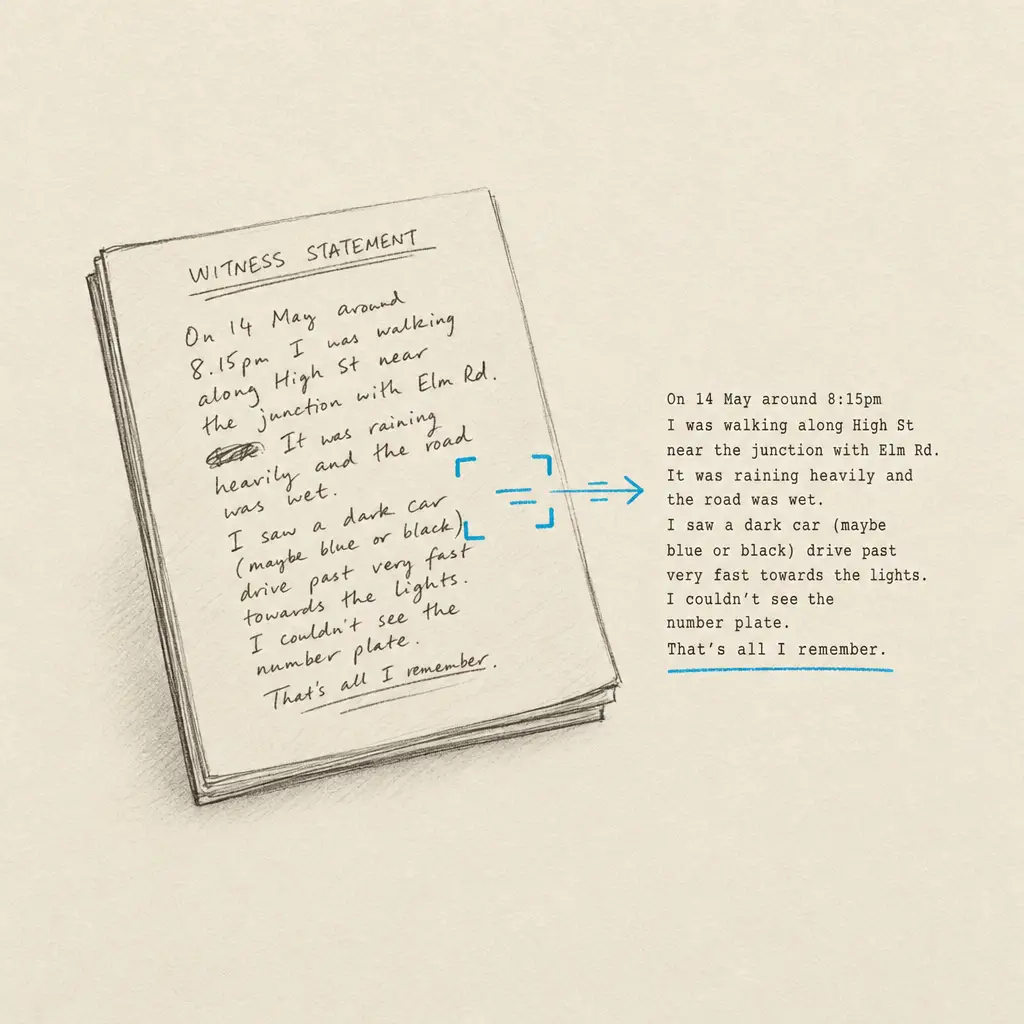
- Handwriting OCR converts witness interview notes and statements into searchable, editable text
- Processes rushed notes taken during interviews, depositions, and witness meetings
- Handles marginalia, annotations, and mixed handwritten/printed documents common in litigation
- Enables keyword searching across witness materials that were previously locked as images
- Manual review remains necessary - this accelerates access and organization, not professional judgment
Witness interviews generate volumes of handwritten notes. Attorneys scribble observations during depositions. Paralegals document client meetings. Investigators capture witness statements in the field. These notes contain case-critical information - inconsistencies in testimony, credibility observations, timeline details, witness demeanor - but in their handwritten form, they remain difficult to search, share, or reference efficiently.
When litigation teams can’t search witness notes electronically, they’re forced to rely on memory or manually review every page when looking for specific details. A single overlooked note about a witness contradiction can weaken case strategy. Missing a critical observation buried in pages of handwritten deposition prep creates avoidable risk.
This page explains what handwriting OCR can and cannot do specifically for witness notes and statements. It’s about understanding whether this technology is relevant when you’re dealing with handwritten witness materials, what realistic accuracy looks like, and where it fits in litigation workflows.
Why Witness Notes Are Still Handwritten
Despite digital recording technology, handwritten notes remain central to witness work in litigation. The reasons are practical and often unavoidable.
Interview Speed and Flexibility
Witness interviews don’t wait for technology to catch up. When a witness is available, attorneys need to capture information immediately, and handwriting remains the fastest, most reliable method that doesn’t depend on equipment, battery life, or recording permissions.
During depositions, attorneys take notes while simultaneously listening, observing body language, and formulating follow-up questions. Handwriting allows this multitasking without the cognitive load of typing or the distraction of devices. The notes may be rushed or abbreviated, but they capture real-time observations that matter for case strategy.
Paralegals documenting client meetings or investigator interviews face similar constraints. The priority is capturing information accurately while maintaining rapport with the witness, not producing perfectly formatted digital notes.
Context and Observations
Witness notes aren’t just transcripts. They include context that doesn’t appear in official recordings. Arrows connect contradictory statements. Marginalia flags credibility concerns. Underlines emphasize critical admissions. These annotations carry strategic value that’s lost when notes remain as static scans.
Legal professionals mark up printed witness statements with observations about demeanor, hesitations, or areas requiring follow-up. These handwritten additions transform routine statements into strategic documents, but only if the team can actually locate and reference the annotations when building arguments or preparing for trial.
Historical and Discovery Materials
Litigation often involves witness materials created years earlier. Previous depositions contain handwritten notes from prior counsel. Historical case files include witness statements captured during original investigations. Discovery materials arrive with handwritten reviewer notes from opposing parties.
These materials exist as scanned images or physical documents. Converting them to searchable text wasn’t a priority when they were created, but now they’re part of active litigation where teams need to locate specific details quickly.
Common sources of handwritten witness materials:
- Deposition preparation notes: Attorney observations, witness credibility assessments, areas for follow-up questioning
- Client interview summaries: Handwritten notes from initial consultations and ongoing client meetings
- Investigator field notes: Witness statements captured during on-site investigations or informal interviews
- Witness statement annotations: Handwritten marginalia on printed statements marking inconsistencies or critical points
- Historical deposition materials: Notes from previous depositions in ongoing or related litigation
- Discovery production notes: Handwritten reviewer observations on documents produced by opposing parties
The Problem With Unsearchable Witness Notes
When witness notes remain as handwritten documents or scanned images, they create specific bottlenecks in litigation workflows.
Manual Review Requirements
Without searchable text, finding a specific witness detail requires manually reading through every page of notes. When preparing cross-examination or verifying timeline details, attorneys must visually scan documents hoping to spot relevant information. This is slow, error-prone, and scales poorly as case materials accumulate.
For complex litigation with multiple witnesses and years of history, the volume becomes unmanageable. A paralegal trying to locate every mention of a particular event across dozens of witness interviews faces hours of manual work. Important details get missed not because they weren’t documented, but because they couldn’t be found efficiently.
Collaboration and Knowledge Transfer
Handwritten witness notes are difficult to share effectively within legal teams. When multiple attorneys need access to deposition observations, distributing scanned PDFs creates isolated copies. Team members can’t search across all witness materials simultaneously. Knowledge remains siloed with whoever took the original notes.
This becomes particularly problematic when cases transfer between attorneys or when new team members join ongoing litigation. Understanding witness history requires reading through physical notebooks or image scans, creating steep learning curves and increasing the risk of overlooking documented patterns or inconsistencies.
Timeline and Consistency Verification
Litigation strategy depends on identifying contradictions in witness testimony and verifying timeline consistency across multiple accounts. When witness notes are unsearchable, this analysis requires manual cross-referencing - comparing handwritten notes side by side, looking for discrepancies in dates, sequences, or factual claims.
Standard OCR technology designed for printed text doesn’t solve this problem. When it encounters handwriting, it produces unusable output with so many errors that manual transcription would have been faster. According to archival institutions like the Library of Congress, traditional OCR simply does not work on handwriting.
The result is that valuable witness information remains functionally inaccessible. The notes exist, but using them efficiently requires either exceptional memory or impractical amounts of manual review time.
What Handwriting OCR Handles in Witness Materials
Handwriting recognition technology designed specifically for variable handwriting approaches witness notes differently than standard OCR. It’s built to handle the rushed, abbreviated, and annotated characteristics of real witness documentation.
Rushed Interview Notes
Witness interview notes are rarely written with perfect penmanship. When attorneys are simultaneously listening, observing, and questioning, their handwriting reflects that split attention. Letters connect inconsistently. Words may be abbreviated. Spacing varies as writers try to keep pace with conversation.
Handwriting OCR is designed to process this kind of rushed writing. It handles variations in letter formation, inconsistent spacing, and the abbreviated style common in professional note-taking. This doesn’t mean it reads every word perfectly, but it’s built to work with real witness notes, not just carefully written samples.
Marginalia and Annotations
Witness statements and deposition transcripts often accumulate handwritten marginalia as legal teams review and analyze testimony. Arrows connect contradictory statements. Notes in margins flag follow-up questions. Highlights and underlines emphasize critical admissions.
Standard OCR struggles with these annotations because they’re mixed with printed text and often squeezed into limited space. Handwriting OCR processes both the printed content and the handwritten additions, preserving the document structure so you can see what was original and what was added during review.
Adele D., a court translator working with challenging legal documents, found that the service “correctly recognized everything - both printed text and handwriting.” For witness materials where understanding reviewer observations matters as much as the original statement, this mixed-content capability makes the difference between a tool that creates extra work and one that genuinely accelerates review.
Multi-Page Witness Notebooks
Attorneys and paralegals often maintain notebooks dedicated to specific witnesses or cases. These notebooks accumulate notes across multiple interviews, conversations, and observations over weeks or months. Processing these materials means handling varying handwriting quality as writing conditions change - rushed notes during phone calls, detailed observations during in-person meetings, brief annotations added later during case review.
Handwriting OCR handles these variations within the same document set. It adapts to different writing speeds and styles as it processes sequential pages, treating the variation as expected rather than as errors to reject.
Realistic Expectations for Witness Note Accuracy
Understanding what to expect from handwriting OCR on witness materials helps determine whether it’s useful for your specific litigation workflow.
The table below shows typical performance across common witness document types:
| Document Type | What Works Well | What May Need Review |
|---|---|---|
| Deposition preparation notes | Full text extraction, captures abbreviations and shorthand | Personal notation systems, extremely abbreviated terminology |
| Client interview summaries | Narrative content, timeline details, factual observations | Context-dependent abbreviations like “K” for contract or thousand |
| Investigator field notes | Mixed printed forms with handwritten entries, witness statements | Severely degraded carbon copies, extremely rushed field writing |
| Witness statement annotations | Marginalia, reviewer notes on printed documents | Overlapping annotations in very tight margin spaces |
| Historical deposition materials | Older handwriting styles, cursive notes from previous decades | Faded photocopies, multi-generation copies with quality loss |
What Processes Well
Witness notes with consistent handwriting, even if rushed, typically convert reliably to searchable text. The system handles abbreviated writing common in legal note-taking - shortened names, standard abbreviations, and informal notation.
Mixed-content documents where printed witness statements contain handwritten annotations process both components. You get searchable text for the original statement and the reviewer’s handwritten observations, maintaining the relationship between the two.
Multi-page notebooks process as complete documents, allowing you to search across an entire witness file rather than page by page. This enables the kind of cross-referencing needed to identify contradictions or verify timeline consistency.
What Requires Review
Personal shorthand systems unique to individual attorneys will need verification. If an attorney uses “W1” to mean the primary witness in one context and “week 1” in another, the system may not infer the correct meaning from context alone. A reviewer familiar with the case will catch these nuances.
Extremely degraded copies present challenges. If investigator field notes exist only as third-generation photocopies where handwriting has become pixelated or faded, even purpose-built handwriting recognition will struggle. These documents may still benefit from processing, but they’ll require more careful review of the output.
The goal isn’t to eliminate human review. The goal is to convert a completely manual process into one where technology handles the mechanical work of text extraction and search enables rapid location of relevant details. Legal professionals focus their time on analysis and verification rather than visual scanning through hundreds of pages.
How This Fits in Litigation Workflows
Handwriting OCR addresses specific bottlenecks in managing witness materials. It’s not a replacement for legal analysis or witness evaluation. It’s a tool for removing friction from processes that currently require extensive manual work.
Deposition and Interview Preparation
When preparing for depositions or witness interviews, attorneys need to review previous notes about the witness quickly. Converting handwritten notes from earlier meetings into searchable text means you can find specific topics, dates, or prior statements without reading through entire notebooks.
If a witness previously made a statement about timeline that needs clarification, searching digitized notes for date references is faster than manually reviewing every page. If credibility observations from initial interviews need to be referenced before cross-examination, keyword search locates relevant sections immediately.
Cross-Referencing Witness Accounts
Litigation strategy often depends on identifying inconsistencies across multiple witness accounts. When witness notes are searchable, legal teams can query for specific events or details across all witness materials simultaneously.
Rather than manually comparing handwritten notes side by side, you can search for mentions of a particular event across depositions, interviews, and statements. Contradictions become visible through search results rather than through exhaustive manual cross-referencing.
Team Collaboration and Knowledge Transfer
Converting witness notes to searchable text creates shared knowledge bases accessible to entire litigation teams. When new attorneys join a case, they can search through digitized witness materials to understand case history without deciphering someone else’s handwritten notebooks.
Paralegals supporting multiple attorneys can search across all witness files when verifying details or preparing summaries. This is particularly valuable in complex litigation where witness relationships and timeline details span hundreds of pages of documentation.
For more context on how this fits within broader litigation and discovery workflows, the parent page covers additional document types and strategic considerations.
Building Witness Chronologies
Creating timeline chronologies from witness materials typically requires reading through all notes and manually extracting dates and events. With searchable witness notes, you can query for date patterns, temporal references, and sequence indicators, then compile chronologies from search results rather than through complete manual review.
This doesn’t eliminate the need for legal judgment about relevance and accuracy, but it removes the mechanical bottleneck of locating timeline information in the first place.
The common thread across these uses is acceleration rather than replacement. The technology handles text extraction and search infrastructure. Legal professionals apply their expertise to interpreting results, evaluating credibility, and making strategic decisions that require professional judgment.
Testing With Your Witness Materials
If you’re dealing with handwritten witness notes and wondering whether this type of tool is relevant to your litigation work, the most direct approach is to test it with your actual documents.
Witness handwriting varies significantly. Deposition notes taken during rapid questioning look different from deliberate investigator field notes. What works well for one attorney’s handwriting might perform differently on another’s. The only way to know if handwriting OCR will accelerate your specific workflow is to try it with the kinds of witness materials you actually work with.
Handwriting OCR offers a free trial with credits you can use to process sample documents. Upload a page of deposition notes, witness interview summaries, or annotated witness statements. See how the output compares to what you’d get from manual transcription or other tools you’ve tried.
Your documents remain confidential throughout this process. They’re processed only to deliver results to you and are not used to train models or shared with anyone else. This matters particularly in litigation contexts where attorney-client privilege and work product protections are not optional.
The service is designed to be straightforward. Upload your scanned witness notes or photographed notebook pages, process them, and download the results as editable, searchable text. There’s no complex setup, no software installation, and no commitment required to test whether it works for your documents.
If it saves you time on the witness materials you tested, it will likely save time on similar documents. If it doesn’t meet your accuracy requirements for these specific materials, you’ve learned that before investing further time. Either way, you’ll have a clearer understanding of where handwriting OCR fits in witness documentation workflows.
Frequently asked questions
Can handwriting OCR process witness notes taken during fast-paced depositions?
Yes, handwriting OCR is designed to handle rushed handwriting common in deposition and interview notes. While extremely hurried writing may require more review, the system processes variable handwriting quality where letters connect inconsistently and spacing varies. The goal is converting notes to searchable text that accelerates location of key details, with the understanding that legal professionals will review output for accuracy on critical points.
Does handwriting OCR work on witness statements with both printed text and handwritten annotations?
Yes, handwriting OCR processes mixed-content documents where printed witness statements contain handwritten marginalia, reviewer notes, or annotations. The system recognizes both the printed text and handwritten additions, preserving document structure so you can see what was original and what was added during review. This is particularly useful for witness statements that accumulate team observations and follow-up notes.
How does handwriting OCR handle personal shorthand or abbreviations in witness notes?
Handwriting OCR processes abbreviated text and converts it to digital form, but context-dependent abbreviations may require review. If an attorney uses "W" to mean witness in one context and week in another, the system extracts the character but may not infer meaning from context alone. Standard legal abbreviations typically process well, while highly personalized notation systems will need verification by someone familiar with the case.
Are witness notes kept confidential when using handwriting OCR?
Yes. Your witness materials remain confidential and are processed only to deliver results to you. Documents are not used to train AI models, not shared with third parties, and not retained longer than necessary to complete processing. This is critical for litigation materials protected by attorney-client privilege and work product doctrine. Confidentiality is built into the service design, not an optional feature.
Can handwriting OCR replace manual review of witness notes?
No, and it's not designed to. Handwriting OCR accelerates the mechanical work of converting witness notes to searchable text, but legal analysis of witness credibility, statement consistency, and strategic importance still requires professional judgment. The tool removes the bottleneck of manual transcription and enables keyword searching, allowing legal teams to focus their time on analysis rather than visually scanning hundreds of pages.