
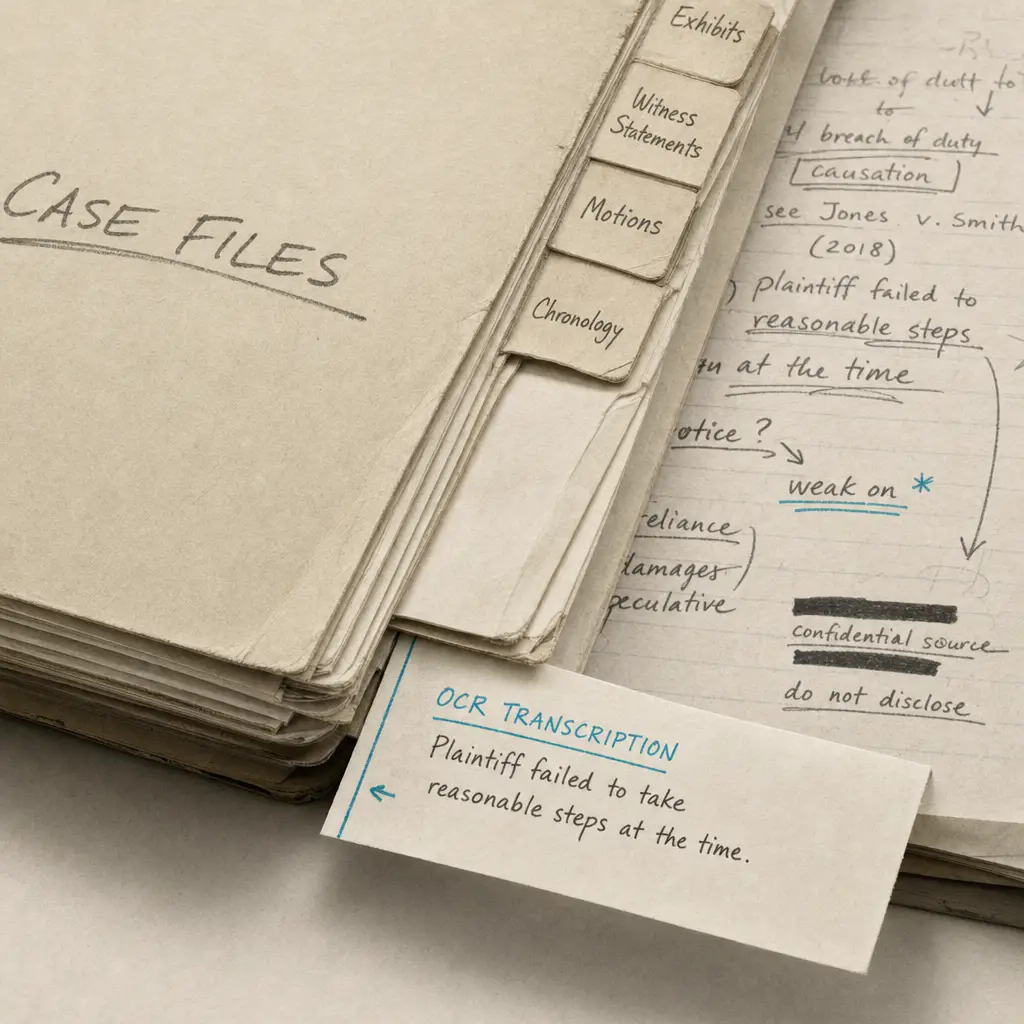
Quick Takeaways
- Internal legal documentation creates searchable knowledge bases that persist across team members and case transitions
- Handwriting OCR processes client interview notes, legal meeting notes, case strategy materials, and lawyer notebooks without requiring manual transcription
- Rushed handwriting from active conversations and meetings is specifically what the technology is designed to handle
- Digitized notes integrate with case management systems, making internal knowledge accessible during conflict checks, case preparation, and team collaboration
- Manual review remains important for context-dependent abbreviations and firm-specific notation systems
Internal legal documentation accumulates throughout every case. Client interview notes capture initial consultations and ongoing conversations. Legal meeting notes record strategy discussions and case planning sessions. Lawyer notebooks contain research findings, observations, and cross-case insights. Registry notes document interactions with courts, agencies, and opposing counsel.
This documentation contains critical case knowledge, but when it remains handwritten, accessing that knowledge requires manual searching through pages of notes. Team members unfamiliar with the original writer’s handwriting struggle to extract relevant details. Case transitions become complicated when strategic thinking is locked in formats only one person can easily read. Knowledge that could inform current cases stays buried in previous files.
The cost isn’t just inefficiency. Handwritten internal documentation becomes effectively invisible to conflict checking systems. Important client statements or case details that only appear in handwritten notes can’t be found through digital searches. Preparation for hearings or depositions requires reading through extensive handwritten materials rather than quickly locating specific prior statements.
This page explains what handwriting OCR can and cannot do specifically for internal legal documentation. It focuses on the unique characteristics of notes created for internal use, what realistic expectations look like for different types of legal notes, and where digital conversion fits in knowledge management workflows.
Why Internal Legal Documentation Differs From Formal Legal Documents
Internal legal notes are fundamentally different from the formal documents that leave a law office. Wills, contracts, and court filings are prepared for external audiences with attention to legibility and formatting. Internal documentation is created for immediate use by the writer and their immediate team, often under time pressure.
Writing conditions reflect working environments:
Client interview notes are taken during active conversations where attorneys balance listening with documentation. Legal meeting notes might be written in conference rooms while multiple people discuss strategy simultaneously. Lawyer notebooks capture thoughts during research or case review when ideas flow faster than careful handwriting allows. Registry notes are often written standing at courthouse counters or agency offices without proper writing surfaces.
These conditions don’t produce the deliberate handwriting found in documents intended for clients or courts. Letters may be abbreviated. Words might run together. Spacing becomes irregular when writing quickly. This is functional note-taking optimized for capturing information rapidly, not creating documents others will read later.
Personal notation systems create interpretation challenges:
Experienced legal professionals develop shorthand for concepts they encounter repeatedly. The same abbreviation might mean different things in different practice areas or even different sections of the same notebook. Arrows, underlining, stars, and marginal symbols carry meaning for the original writer but require interpretation by others.
Unlike formal legal documents where terminology follows established patterns, internal notes use whatever notation makes sense to the writer in the moment. This makes perfect sense during active note-taking but creates ambiguity when someone else needs to understand the notes months or years later.
Document structure varies by individual and purpose:
Some attorneys use structured templates for client interviews while others prefer freeform legal pads. Meeting notes might follow formal agendas or capture discussion in chronological order. Lawyer notebooks range from organized topic sections to stream-of-consciousness research notes. Registry notes might be brief reminders or detailed documentation depending on the interaction.
This variation means there’s no standard format for internal legal documentation across the profession or even within single firms. Each attorney develops approaches that work for their thinking and workflow, which creates challenges when that documentation needs to be accessible to others.
What Handwriting OCR Handles in Internal Legal Documentation
Handwriting recognition designed for variable handwriting approaches internal legal notes by processing the rushed, abbreviated writing that characterizes real-world practice. It’s built to handle documentation created under working conditions rather than expecting idealized handwriting.
Rushed Handwriting from Working Environments
Internal legal documentation is rarely written slowly. Client interviews happen in real time. Legal meetings involve multiple speakers making points while you’re still writing the previous observation. Research insights are captured quickly before moving to the next source. Registry interactions at courthouses don’t allow time for careful penmanship.
This produces handwriting with partially formed letters, irregular spacing, and inconsistent sizing. Standard OCR systems built for printed text fail completely on this type of content because they expect consistency that doesn’t exist in functional note-taking.
Handwriting OCR is trained on diverse writing styles including the rushed notes that characterize real legal practice. It recognizes patterns even when individual letters aren’t fully formed or when cursive writing becomes less distinct under time pressure. This doesn’t guarantee perfect accuracy on every word, but it handles the variability that defines actual internal documentation.
Legal professionals report that this capability changes how knowledge is shared across teams. Rather than being the only person who can read your own notes from last year’s case, the information becomes accessible to colleagues working on related matters or taking over cases during transitions.
Notebooks and Sequential Note-Taking
Lawyer notebooks present unique challenges because they often span months or years of entries across multiple cases. A single notebook might contain client interview notes, research findings, meeting observations, and hearing preparation all mixed together chronologically rather than organized by case.
Standard approaches to digitizing notebooks either require manually organizing entries by case first, which is extremely time-consuming, or result in one massive digital file where finding specific information is only marginally better than searching the handwritten original.
Handwriting OCR processes notebooks page by page, converting each entry to searchable text while preserving the original sequence. This allows searching across all entries for specific client names, case numbers, or legal concepts without manually organizing content first. The chronological structure is maintained, but the content becomes findable.
When attorneys need to understand their prior thinking on a legal question or locate notes from a client conversation that happened months ago, being able to search digitized notebook content is substantially faster than paging through handwritten entries hoping to recognize relevant sections.
Mixed Content in Meeting Notes and Documentation
Internal legal documentation frequently combines different content types on the same page. Meeting notes might include typed agendas with handwritten discussion points. Client interview forms combine printed questions with handwritten responses. Case strategy documents mix printed case summaries with handwritten tactical notes.
Standard OCR handles printed text but typically fails when handwriting appears on the same page. It may skip handwritten portions entirely, process only the printed text, or become confused by mixed formats and produce errors throughout.
Handwriting OCR processes both content types together. It recognizes printed text and handwritten additions on the same page, preserving the document structure so you can see what was pre-printed and what was added during meetings or interviews. This matters when reviewing documentation months later, where understanding context requires seeing both the structured form and the handwritten responses.
Common Legal Abbreviations and Firm-Specific Shorthand
Legal professionals develop abbreviated forms for concepts they encounter regularly. “Def” for defendant, “Pl” for plaintiff, “Disc” for discovery, “Mot” for motion - these shortened forms appear consistently enough that they’re recognizable even if they’re not universal across all practice areas.
The system processes these abbreviations as they appear in the original notes. It doesn’t attempt to expand them or make assumptions about meaning, which is appropriate since context determines interpretation. “P” might mean plaintiff, parent, petitioner, or property depending on the case type and discussion context.
This approach respects the reality that legal professionals understand their own abbreviations and firm-specific shorthand. A system that attempted to automatically interpret these notations would create more confusion than clarity. Better to preserve original notation and let reviewers apply their knowledge of case context and firm practices.
What Requires Manual Review and Verification
Internal legal documentation presents specific challenges that require human judgment even after digital conversion. Understanding these limitations helps set realistic expectations about what automation handles and where professional review remains essential.
Context-dependent notation needs interpretation:
Personal shorthand systems used by individual attorneys may not follow recognizable patterns outside that person’s practice. When someone uses “K” for contract in transactional notes but for thousand in settlement discussions, the OCR system preserves what’s written but cannot determine intended meaning from context alone. A legal professional reviewing the notes will understand from surrounding content which interpretation applies.
This isn’t a technology limitation - it’s appropriate behavior. Automatically guessing at personal notation meanings would introduce errors that undermine the notes’ value for legal review. Preserving original notation and allowing human reviewers to apply case knowledge during verification maintains accuracy.
Spatial relationships and visual organization:
Internal legal notes often use spatial layout to convey meaning. Arrows connect related points across the page. Circles or boxes highlight critical details. Indentation shows hierarchical relationships between concepts. Marginal annotations reference specific sections of text.
Handwriting OCR converts text content but may not perfectly preserve all spatial relationships and graphical elements. When an attorney draws an arrow from a client statement to a follow-up question, that spatial relationship might not appear in the digital output. Circled text may be recognized without the circle itself.
This means reviewers should reference original documents when spatial layout contributes to meaning. The digital text makes content searchable and accessible, but the original provides complete context including visual organization.
Multi-case notebooks require organization:
When notebooks contain entries from multiple cases mixed chronologically, digital conversion makes content searchable but doesn’t automatically organize entries by case. If you need case-specific documentation extracted from general notebooks, that organization still requires human review to identify which entries relate to which matters.
The value is that searching becomes possible. Rather than reading every page looking for mentions of a specific case or client, you can search the digitized content and identify relevant sections quickly. But extracting those sections into case-specific files remains a manual step that requires understanding case context.
Firm-specific practices and terminology:
Every law firm develops internal practices, terminology, and documentation approaches that reflect their specific workflows. Reference codes for case management systems, internal matter numbers, or firm-specific abbreviations for common procedures may appear in notes.
The OCR system processes these notations as written text without understanding their meaning within firm systems. Human reviewers familiar with internal practices will recognize these references and understand their significance, but the technology simply preserves them as text.
Where This Fits in Legal Practice Workflows
Converting internal legal documentation to searchable text addresses specific knowledge management challenges in legal practice. It’s not about replacing professional judgment or eliminating manual review. It’s about making knowledge captured in handwritten notes accessible to legal teams more efficiently than current manual processes allow.
How legal professionals use handwriting OCR for internal documentation:
Team knowledge sharing: When multiple attorneys work on a case over time, everyone needs access to prior thinking, client statements, and strategic decisions documented in earlier notes. Digitized internal documentation allows team members to search for specific details without deciphering handwriting from colleagues they may never have met or trying to understand notes written years ago.
This becomes particularly valuable in larger firms where cases transition between attorneys, or when junior associates need to understand case history before client meetings. Rather than spending hours reading through handwritten files hoping to find relevant details, they can search digitally for specific topics, client statements, or strategic decisions.
Conflict checking and intake processes: When potential new clients contact a firm, intake staff must check for conflicts with existing clients and matters. This requires searching client names, related parties, opposing counsel, and other details across all firm documentation. If internal notes remain handwritten, they’re invisible to conflict checking systems.
Digitized client interview notes, meeting records, and case documentation make this information searchable during intake. When a prospective client mentions involvement with parties from previous matters, conflict searches can identify these connections even if they only appeared in handwritten internal notes. This improves conflict detection and protects firms from ethical complications.
Adele D., a court translator who processes challenging legal documents daily, found that handwriting OCR “correctly recognized everything - both printed text and handwriting.” For conflict checking that requires searching across years of mixed documentation, this accuracy is essential.
Case preparation and hearing readiness: Before client meetings, depositions, or court appearances, attorneys review prior documentation to refresh their understanding of case details and client positions. Searching through digitized notes is substantially faster than reading handwritten originals page by page.
When preparing for depositions or witness examination, being able to search prior interview notes and meeting records for specific statements helps attorneys identify relevant prior positions or inconsistencies. Rather than relying on memory or incomplete manual review, they can locate specific prior statements quickly.
Long-term knowledge management: Legal insights, research findings, and strategic approaches documented in lawyer notebooks represent valuable intellectual capital. When this knowledge remains locked in handwritten notebooks that only the original writer can efficiently access, the firm loses that value when attorneys leave or as notebooks accumulate over years.
Digitizing lawyer notebooks creates searchable repositories of legal research and strategic thinking. When attorneys encounter similar legal questions years later, they can search prior research notes rather than starting from scratch. When experienced attorneys retire, their documented insights remain accessible to the firm rather than becoming inaccessible handwritten archives.
Document production and compliance: When regulatory bodies, ethics boards, or opposing counsel request case documentation, firms need to produce relevant materials efficiently. Internal notes often contain information required for complete production, but handwritten materials are difficult to review for relevance and redact for privilege.
Digitized internal documentation makes it possible to search for relevant topics, review digital text for privilege concerns, and produce materials more efficiently than manually reviewing handwritten files. This doesn’t eliminate the need for attorney review, but it accelerates the process of identifying potentially relevant documentation.
The common thread across these uses is accessibility. Converting handwritten internal documentation to digital text removes the bottleneck of locked handwritten formats. Legal professionals still apply their expertise to interpretation, verification, and strategic use of the information. The technology simply makes knowledge findable.
For context on how internal documentation fits within broader legal handwriting OCR applications, the parent page provides additional perspective on formal legal documents and external materials that complement internal documentation workflows.
Related Internal Legal Documentation Types
Internal legal documentation encompasses several specific types of materials, each with unique characteristics:
Client interview notes capture initial consultations, intake meetings, and ongoing client conversations. These notes are typically written during active discussions, producing rushed handwriting that prioritizes capturing information over legibility.
Legal meeting notes document strategy discussions, case planning sessions, and team meetings. They combine structured agendas with freeform observation, often including multiple speakers’ contributions and real-time strategic thinking.
Case strategy notes contain tactical planning, legal research findings, and analytical thinking about case approaches. These materials represent attorney work product and contain the strategic insights that drive case outcomes.
Lawyer notebooks span months or years of entries across multiple cases. They mix research findings, client observations, hearing notes, and professional insights in chronological rather than case-organized formats.
Registry notes document interactions with courts, administrative agencies, and opposing counsel. They capture procedural details, filing confirmations, and scheduling information that supports case timeline management.
Each type presents unique challenges for handwriting recognition, but all share the characteristic of being created for internal use under working conditions rather than prepared for external audiences.
Getting Started with Your Internal Legal Documentation
If you’re dealing with backlogs of handwritten internal documentation or want to make current note-taking more accessible to your legal team, the most direct approach is testing with actual documents from your practice.
Internal legal documentation varies significantly by individual writing style, practice area, and firm culture. What works well for one attorney’s structured interview forms might perform differently on another’s freeform meeting notes. The only way to know if handwriting OCR will improve your specific workflows is to try it with the types of internal documentation you actually create.
HandwritingOCR offers a free trial with credits you can use to process sample internal documentation. Upload pages from recent client interviews, legal meeting notes from the past month, or sections from lawyer notebooks you want to make searchable. See how the output compares to what you’d get from manual transcription or attempting to search through handwritten originals.
Your internal documentation remains confidential throughout this process. Documents are processed only to deliver results to you and are not used to train AI models or shared with anyone else. This matters in legal practice where attorney work product and client information confidentiality is non-negotiable.
The service is designed to be straightforward. Upload scanned notes, process them, and download the results as searchable text in formats compatible with your document management system. There’s no complex setup, no software installation, and no commitment required to test whether it works for your internal documentation.
If it saves time on the sample documentation you tested, it will likely provide similar value for other internal materials from your practice. If accuracy doesn’t meet your requirements for specific types of notes, you’ll know that before investing further. Either way, you’ll have clearer understanding of where digital conversion fits in internal knowledge management workflows.
Frequently asked questions
Can handwriting OCR handle lawyer notebooks that span multiple cases?
Yes, handwriting OCR processes lawyer notebooks page by page regardless of how many cases they cover. The chronological structure is preserved, and the content becomes searchable so you can locate specific client names, legal concepts, or case numbers across all entries. While the technology doesn't automatically organize entries by case, making notebook content searchable enables you to quickly find relevant sections rather than manually paging through months or years of handwritten entries.
Will OCR work on rushed handwriting from client interviews and legal meetings?
Yes, handwriting OCR is specifically designed to process variable handwriting quality including rushed notes taken during active conversations and meetings. While extremely stylized personal handwriting or heavy abbreviation may require more review, the system handles the rapid writing that characterizes real internal legal documentation. The best way to assess performance on your specific note-taking style is to test with actual internal documentation from your practice.
Can I process internal documentation that contains attorney work product?
Yes. Your internal legal documentation remains confidential and is processed only to deliver results to you. Documents are not used to train AI models, not shared with third parties, and not retained longer than necessary to complete processing. This is essential for legal materials where attorney work product and client confidentiality are professional obligations, not preferences.
Will the system understand my firm's internal abbreviations and notation?
Handwriting OCR processes abbreviations and notation as they appear in your documents without attempting to interpret or expand them. This is appropriate because firm-specific abbreviations and personal shorthand can have different meanings in different contexts. The output preserves your original notation for human review by people familiar with your firm's practices, rather than introducing potential errors through automated interpretation.
What file formats work for scanning internal legal documentation?
Handwriting OCR processes scanned PDFs and common image formats including JPG, PNG, and TIFF. You can scan notes from legal pads, meeting notes, lawyer notebooks, or other internal documentation using standard office scanners and upload them directly without converting to specific formats. The output can be downloaded as searchable text in Word (DOCX), Markdown, or plain text formats depending on your case management system needs.