
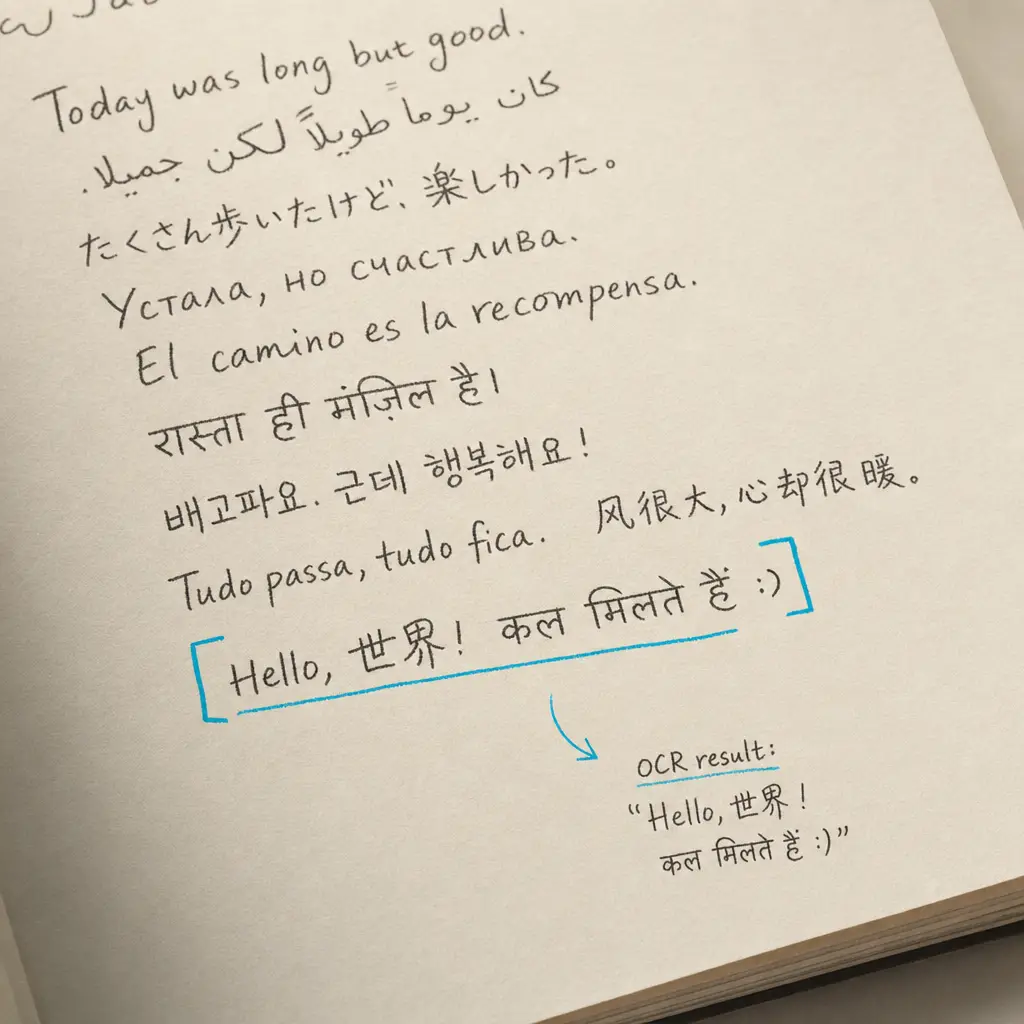
If you write in more than one language, you have probably noticed that most handwriting recognition tools quietly fall apart. You switch languages mid-page, or your document mixes a native language with a second one you use professionally, and the output is either a string of misspellings or something that barely resembles the original text. This is not a misconfiguration problem. It is a design limitation in most tools for handwriting recognition across multiple languages, and it affects a large number of people. Roughly half the world’s population is bilingual or multilingual, and many of them take notes, keep journals, or work with documents that naturally reflect that. This guide explains why the one-language-at-a-time problem exists, what causes it technically, and how multilingual OCR handles it without requiring any setup from you.
Quick Takeaways
- Most e-ink tablets and traditional OCR tools require you to declare a single language before recognition runs, which causes systematic errors on any content written in a different language.
- This is an architectural limitation, not a bug. Dictionary-based recognition systems need to know the language before they can disambiguate uncertain characters.
- Modern AI-native OCR is trained across many languages simultaneously, so mixed-language documents are handled without any settings being changed.
- Latin-based scripts perform best. Less common scripts work too, but accuracy varies by document quality and how widely the language is represented in training data.
- The free trial at HandwritingOCR gives you 5 pages to test your own documents before committing to anything.
Why So Many People Write in Multiple Languages
Multilingual writing is not unusual. It is the normal output of a life lived across languages.
A Dutch professional who learned English at university often annotates English-language reports with Dutch shorthand, simply because it is faster. A graduate student working in a second language still writes margin notes in their native tongue when thinking quickly. A heritage language speaker whose grandparents wrote letters in Polish or German has documents that are, by their nature, in multiple languages across multiple generations.
Genealogists face this in a concentrated way. Polish parish records from the 19th century, for instance, might be written in German, Latin, Polish, or Russian depending on the decade and the occupying power. A single family archive can span four languages without anyone having chosen that.
Then there are the e-ink tablet users. The reMarkable, Supernote, and Boox communities have grown substantially, and they attract multilingual writers precisely because handwriting feels natural across languages in a way that typing sometimes does not. Many users in those communities write in two languages on the same page without thinking about it, until they try to extract the text.
Roughly half the world’s population is bilingual or multilingual. Mixed-language handwriting is not an edge case. It is how a significant portion of the world actually writes.
The One-Language-at-a-Time Problem
If you use a reMarkable tablet, you have run into this. The built-in handwriting conversion requires you to set a “Handwriting Language” in settings before you convert your notes. The recognition engine behind it supports 66 languages, but only one is active per session. Write in French when the device is set to English, and the result is described by users in the community as “gibberish.”
This is not a reMarkable-specific failure. Supernote works the same way. A thread in the Supernote community states it plainly: OCR as designed requires the choice of only one language, so words written in the other language are systematically misread because they do not appear in the selected language’s dictionary. Boox defaults to Chinese and English and requires manual switching. There is no simultaneous multi-language option on any of these devices.
The limitation shows up repeatedly on community forums. German and English writers, Dutch and English writers, Polish and English writers all report the same experience. It is one of the most commonly cited practical frustrations with tablet-based text conversion.
Why Traditional OCR Tools Also Struggle
Desktop and cloud OCR tools designed for printed documents have a similar structural problem, though it shows up differently.
Tesseract, the widely used open-source OCR engine, requires users to specify language packs explicitly before processing. You would pass something like -l eng+fra to process English and French together. But this does not mean Tesseract handles mixed languages gracefully. There is a documented failure mode where running two language packs together causes one language to suppress the other. The underlying reason is that these systems use language models based on dictionaries and grammar rules to resolve ambiguous characters. To resolve ambiguity, the system needs to know which language’s dictionary to consult. That decision has to be made before recognition runs, not discovered during it.
Specialist tools for historical handwriting have similar requirements. Processing a multi-period archive that spans German, Latin, and Polish would require selecting separate models for each language, script, and time period and running documents through each separately.
The core problem is the same across all these tools: language is declared before recognition begins, not inferred from what is actually on the page.
This is why a document with a Latin-language heading, German body text, and Polish personal names causes so many tools to stumble. Each section of text requires a different model or dictionary, and there is no automatic handover between them.
How AI-Native Multilingual OCR Works Differently
The approach that resolves this does not rely on dictionaries or pre-declared language packs.
Modern deep learning OCR models are trained on very large collections of handwritten examples across many different scripts and languages at the same time. The model learns to recognise characters and letter shapes as visual patterns. It does not need to be told “this is German” because it has seen enough variation across enough scripts that it can work out what a character is from the image alone.
Language context still matters for resolving genuinely ambiguous characters, but in a well-trained multilingual model that context is learned at a script and character level, not applied as a post-processing filter from a single dictionary. A page with German paragraph headers, English annotations, and a Polish surname in the margin can all be returned accurately in a single pass without any settings being changed.
This is also what makes it practical for the use cases described above. The genealogist uploading a 19th-century Polish record does not need to know in advance which language it is written in. The tablet user exporting a mixed-language notebook page does not need to re-run processing with different settings for different sections. The document goes in, and the text comes out.
Your documents are processed only to deliver your results. Nothing you upload is used to train models or shared with anyone else. For researchers and genealogists working with sensitive personal records, that is worth stating clearly.
Practical Use: Digitising a Mixed-Language Document
The workflow is the same regardless of which language or combination of languages your document contains.
For e-ink tablet users
Export your notebook page from your reMarkable, Supernote, or Boox device as a PNG or PDF. Upload the file to HandwritingOCR. Download the result in TXT, DOCX, or PDF format. Processing typically takes 15 to 20 seconds. There is no language configuration step. If you have been getting poor results from your device’s built-in conversion on multilingual pages, this is the simplest fix.
For genealogy researchers
Scan page-sized documents at 300 DPI. Resist the urge to go higher: we rescale uploads to 2000 px on the longest side, which a letter-size page reaches at around 180 DPI, so 600 DPI costs you scan time and gets discarded before processing. Save the higher settings for genuinely small originals such as index cards or slips under about 3.5 inches. Contrast between ink and paper matters far more than resolution here, and for faded ink a greyscale or colour scan helps where extra DPI cannot. Upload the scan as a PDF or JPG. For multi-page documents, a single PDF keeps everything together. You can download the transcription as a DOCX and then use the translation feature in the same tool if you need the content in a language you read more comfortably.
Related guides for specific document types
If you are working with specific historical scripts, there is supporting content that may be useful alongside this workflow. Old German scripts like Sütterlin and Kurrent have their own characteristics worth understanding before you upload. For wartime letters and journals, document condition and ink fading are the main factors affecting accuracy. Civil war letters and documents follow similar practical considerations. For medieval handwriting transcription and Latin manuscripts and church records, the results depend heavily on scan quality and the clarity of the original script. If you want to convert cursive handwriting from old letters, the same upload process applies.
The free trial includes 5 credits, which is 5 pages. That is enough to test a representative sample of your documents before deciding whether to continue.
Which Languages Get the Best Multilingual OCR Results
Multilingual handwriting recognition does not mean uniform results across all 300+ languages. Being clear about this is more useful than leaving it vague.
| Script / Language Group | Examples | Expected Performance |
|---|---|---|
| Latin-based scripts | English, French, German, Spanish, Polish, Dutch, Italian, Portuguese | Best accuracy; largest training data |
| Cyrillic scripts | Russian, Ukrainian, Bulgarian | Strong performance |
| Arabic script | Arabic, Farsi, Urdu | Good coverage; quality-dependent |
| CJK scripts | Chinese, Japanese, Korean | Supported; complex characters are resolution-sensitive |
| Less common scripts | Many regional and minority languages | Varies; free trial recommended |
The consistent factor across all languages is document quality. Contrast, resolution, and legibility affect results regardless of which script you are working with. A well-photographed document in a less common language will usually produce better results than a faded, low-resolution scan of a widely supported one.
For genealogists working with documents they cannot read, the translation feature is available on all plans. You can transcribe and translate in the same step, which is often the practical goal when the language is one you are working to learn rather than one you already read fluently.
Document quality matters more than any other variable. A clean, well-lit scan at 300 DPI will consistently outperform a low-contrast photograph, regardless of language. Contrast beats resolution.
Conclusion
Most handwriting recognition tools were not built for multilingual writers. The one-language-at-a-time limitation is deeply embedded in how dictionary-based recognition systems work, and it shows up whether you are using an e-ink tablet, an open-source OCR tool, or a specialist historical transcription platform.
The practical answer is a tool trained on multilingual data from the start, where language is recognised from what is on the page rather than declared before processing begins. That is how HandwritingOCR handles the 300+ languages it supports, without any configuration step required from you. Your documents remain private and are processed only to deliver your results.
If you have mixed-language documents that other tools have not handled well, the free trial gives you five pages to test with a representative sample of your work. Try HandwritingOCR free and see what comes back.
Frequently asked questions
Can OCR read the Spanish ñ and accented vowels correctly?
Generic OCR often misreads the ñ because in handwriting the tilde is written as a flat stroke rather than the curved print mark, and accented vowels (á, é, í, ó, ú) and the diaeresis (ü) are easily confused with their unaccented forms. An engine trained on Spanish handwriting distinguishes these diacritics correctly, which matters for names, places, and meaning.
Why are Spanish colonial documents so hard to transcribe?
Colonial archives use distinct calligraphic styles. Cortesana (Secretary hand) was common from roughly 1400 to 1640 and is moderately hard, while Procesal and Procesal Encadenada are the hardest, with chain-like writing where word boundaries nearly disappear. Itálica and Humanística, after 1640, are much more legible. Post-1800 documents tend to be the most readable and produce the best OCR results.
Does multilingual OCR help with Latin American church records?
Yes. Parish records such as baptism, marriage, and death registers are among the most sought-after genealogy documents, with some Mexican records dating to the late 1500s. A Spanish-trained OCR tool lets you upload scanned pages and receive transcribed text without learning historical paleography, though pre-1800 manuscripts are harder and benefit from higher scan quality.