
Quick Takeaways
- Handwritten annotations on legal exhibits often contain strategic insights and case theories that are critical to trial preparation
- OCR converts these handwritten markups into searchable text, saving hours of manual searching during discovery and trial prep
- Searchable annotations enable legal teams to collaborate more effectively and quickly locate key insights across hundreds of exhibits
- Privacy-focused OCR keeps sensitive case materials secure while making them accessible to your team
You’ve spent hours reviewing exhibits, marking key passages, noting evidentiary issues, and jotting down case theories directly on the documents. These handwritten annotations represent some of your most valuable trial preparation work. But when you need to find that specific note about witness credibility or that markup highlighting a contract inconsistency, you’re stuck flipping through hundreds of pages.
The problem isn’t that you didn’t document your insights. It’s that handwritten annotations remain trapped on paper, unsearchable and difficult to share with your litigation team. When trial preparation accelerates and depositions approach, that lack of searchability costs time you don’t have.
Handwriting OCR changes this. It converts those handwritten markups on legal exhibits into searchable, shareable digital text. You can finally search across all your annotated exhibits at once, share insights instantly with colleagues, and build a searchable database of case-critical observations.
Why Handwritten Annotations on Exhibits Matter
Legal exhibits don’t just contain evidence. They tell stories, reveal inconsistencies, and establish timelines. When attorneys review exhibits during discovery and case preparation, handwritten annotations capture the strategic thinking that transforms raw documents into persuasive arguments.
Strategic Value of Attorney Markups
Attorney annotations on exhibits serve multiple purposes. They identify key passages for direct examination. They flag potential impeachment material. They connect exhibits to witness statements or other evidence. A handwritten note like “contradicts deposition testimony p. 47” or “intent to defraud” represents legal analysis that took minutes to develop but seconds to write.
These markups often appear during the first comprehensive review of discovery materials, when patterns emerge and case theories develop. Converting handwriting to text makes this strategic thinking accessible to the entire litigation team.
Handwritten exhibit annotations capture the moment when evidence becomes argument.
The Challenge of Unsearchable Annotations
Paper-based annotations create significant practical problems. You can’t search them. You can’t easily share them with co-counsel or litigation support staff. When preparing for trial months after initial review, you may struggle to remember which exhibit contained that crucial observation about document authenticity.
Many state court rules now require exhibits to be text-searchable where feasible. While courts typically exempt entirely handwritten documents from this requirement, the practical value of searchability applies just as strongly to attorney markups on exhibits as it does to the underlying documents.
Common Problems With Handwritten Exhibit Annotations
The limitations of handwritten annotations become most apparent when litigation timelines compress and the volume of exhibits grows.
Lost Time During Trial Preparation
Trial preparation demands quick access to specific information across hundreds or thousands of exhibit pages. When your annotations exist only as handwritten markups on paper or scanned PDFs, finding a specific note requires manual page-by-page review.
You might remember writing a note about a signature irregularity, but not which of the 47 contracts in Exhibit Set C contained it. Without searchable annotations, you spend 20 minutes locating what should take 20 seconds to find. In litigation and discovery, the ability to quickly search through large volumes of documents can be a game-changer.
| Task | Manual Review | Searchable OCR |
|---|---|---|
| Find specific annotation | 15-30 minutes | 10-30 seconds |
| Share notes with team | Copy/scan/email | Instant digital access |
| Reference during deposition | Page flipping | Keyword search |
| Build exhibit outline | Hours of review | Automated extraction |
Difficulty Sharing Insights With Team Members
Modern litigation involves collaboration across attorneys, paralegals, litigation support staff, and sometimes multiple law firms. Your handwritten annotations contain valuable insights, but sharing them effectively requires either scanning and emailing individual pages or summarizing observations in separate documents.
Neither approach is efficient. Scanned handwritten annotations remain unsearchable. Manually transcribing notes into case management systems takes time and introduces transcription errors.
No Way to Search Across Hundreds of Annotated Pages
As exhibit counts grow, the value of searchability increases exponentially. With 50 annotated exhibits, manual review might be manageable. With 500 exhibits marked up by multiple attorneys over months of discovery, finding specific annotations without search functionality becomes nearly impossible.
You can’t search for all annotations mentioning a specific witness. You can’t quickly locate every markup related to damages calculations. You can’t build a comprehensive timeline using annotations scattered across dozens of exhibits.
How OCR Converts Handwritten Annotations to Searchable Text
Optical character recognition technology has advanced significantly in recent years. Modern handwriting OCR uses artificial intelligence specifically trained to recognize handwritten text, including the quick, informal markups attorneys make on exhibits.
Intelligent Character Recognition for Handwritten Markups
Intelligent Character Recognition (ICR) applies artificial intelligence and machine learning to recognize handwritten text. Unlike traditional OCR designed for typed text, ICR analyzes curves, loops, and intersections to adapt to individual handwriting styles.
This capability is particularly valuable when digitizing annotated contracts, handwritten witness notes, or attorney markups on discovery materials. The technology learns from patterns in handwriting, improving accuracy even with rushed or informal writing styles common in legal annotations.
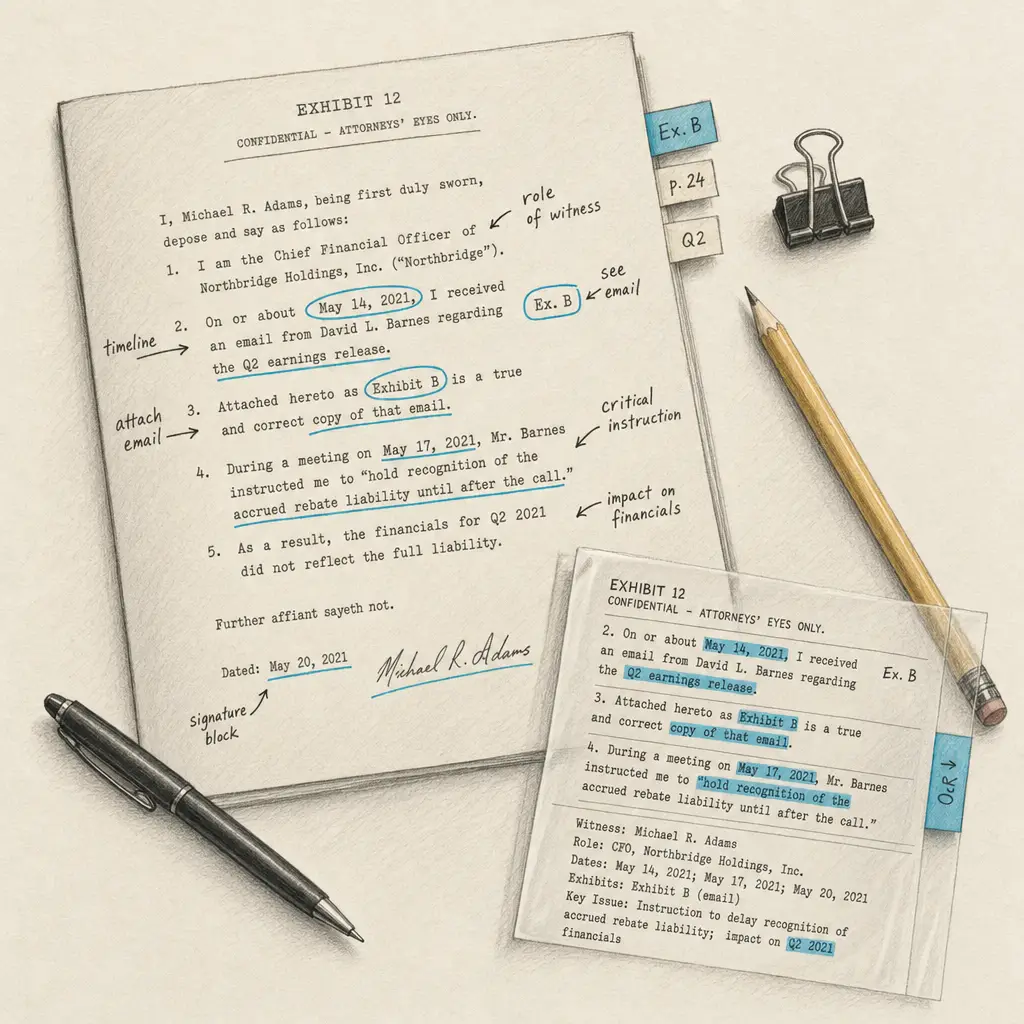
When you convert handwritten PDFs to text, the OCR system processes each page, identifies handwritten elements, and converts them to machine-readable text while preserving their location and context.
ICR technology can distinguish between typed exhibit text and handwritten annotations, processing each appropriately.
Preserving the Relationship Between Typed Text and Handwritten Notes
The most sophisticated legal OCR solutions do more than just recognize handwriting. They preserve the critical relationships between printed text and handwritten annotations that give these documents their meaning.
When you write “see Ex. 14” next to a contract clause or circle a date with an arrow to related testimony, the spatial relationship matters. During OCR preprocessing, advanced systems can distinguish between typed and handwritten content, such as attorney annotations or initials in margins, while maintaining the connection between markup and underlying text.
What to Expect When Digitizing Annotated Exhibits
Converting handwritten annotations to searchable text follows a straightforward process, but understanding what to expect helps you prepare exhibits appropriately and evaluate results accurately.
Upload, Process, Download Workflow
The digitization workflow is simple. You upload PDF files or images of your annotated exhibits. The OCR system processes the handwriting, converting annotations to searchable text. You download the results in your preferred format, whether that’s searchable PDF, Word, Excel, or plain text.
For legal teams managing multiple cases, this workflow integrates smoothly with existing document management systems. You can convert handwriting quickly and incorporate the searchable results into case databases or litigation support platforms.
Processing time depends on volume and complexity. A single annotated exhibit might process in seconds. Bulk processing of hundreds of marked-up documents happens in the background, with results delivered when complete.
Accuracy Considerations for Legal Handwriting
Handwriting OCR accuracy varies based on several factors: writing clarity, annotation density, scan quality, and handwriting style. Attorney markups on exhibits tend to be brief and focused, which often works well for OCR processing.
For best results, ensure scans are clear and well-lit. Annotations written in dark ink process more accurately than light pencil markings. Brief notes and labels typically convert more reliably than lengthy paragraphs of handwritten analysis.
You can improve OCR accuracy by using consistent handwriting, avoiding overlapping annotations, and ensuring adequate contrast between handwriting and background. That said, even informal attorney markups generally process well enough to enable searching and quick reference.
Privacy and Security for Case Materials
Legal exhibits and attorney annotations often contain privileged information, confidential business records, and sensitive personal data. Privacy protection isn’t optional.
HandwritingOCR processes your documents only to deliver your results. Your files remain yours. They’re not used to train AI models or shared with anyone else. Documents are processed securely and deleted after processing completes.
This privacy-first approach means you can digitize annotated exhibits containing privileged attorney work product, confidential settlement discussions, or sensitive witness information without compromising case confidentiality. Learn more about our privacy and security practices.
Your annotated exhibits remain confidential and are processed only to deliver searchable results to you.
Making Handwritten Annotations Work for Your Case
Converting handwritten annotations to searchable text opens up several practical applications for litigation teams.
Creating Searchable Exhibit Databases
Once annotations become searchable, you can build comprehensive exhibit databases that capture both the underlying documents and attorney analysis. Search for all markups mentioning specific witnesses, damages categories, or evidentiary issues.
Full-text searching of annotations transforms how litigation teams work with exhibits. Instead of relying on memory or manually created indices, you can search your own annotated insights as easily as you search the exhibits themselves.
This searchability becomes particularly valuable when preparing witness examinations, drafting motions, or responding to discovery. You can quickly locate every annotation related to a specific claim element or defense theory.
Collaboration Across Litigation Teams
Digital, searchable annotations enable true collaboration. When multiple attorneys review different portions of discovery, their handwritten insights can be pooled into a shared, searchable database.
Junior associates can search senior partner annotations for strategic guidance. Litigation support staff can extract and organize annotated exhibits by theme or issue. Co-counsel in different offices can access the same annotated exhibit set without physically shipping boxes of marked-up documents.
Preparing for Trial and Depositions
Trial preparation requires synthesizing months or years of case development. Searchable annotations help you quickly build exhibit lists, prepare direct examination outlines, and identify impeachment material.
During depositions, you can search annotations in real-time to find exhibits supporting specific questioning lines. When opposing counsel makes unexpected concessions or contradictory statements, searchable exhibit markups help you quickly locate corroborating or impeaching documents.
Convert Your Annotated Exhibits to Searchable Text
Your handwritten annotations on legal exhibits represent hours of strategic analysis and case development. That work shouldn’t remain trapped on paper, unsearchable and difficult to share.
Handwriting OCR converts attorney markups into searchable, shareable text. You save time during trial preparation. You collaborate more effectively with your litigation team. You build searchable databases of case insights that took months to develop.
The process is straightforward. The privacy protections are built-in. The results make your annotated exhibits finally work the way digital case management should.
With HandwritingOCR, you can unlock the strategic value of your exhibit annotations without compromising confidentiality or spending hours on manual transcription.
Ready to make your handwritten exhibit annotations searchable? Try HandwritingOCR with free credits at https://app.handwritingocr.com/register.
Frequently asked questions
Can OCR accurately read attorney handwriting on legal exhibits?
Yes, modern handwriting OCR uses intelligent character recognition (ICR) trained specifically for handwritten text. While accuracy varies based on handwriting clarity and scan quality, attorney annotations typically process well because they tend to be brief, focused notes rather than lengthy paragraphs. Brief labels, case theories, and evidentiary observations generally convert reliably enough for searching and reference.
Will OCR preserve the connection between my handwritten annotations and the underlying exhibit text?
Advanced OCR systems can distinguish between typed exhibit text and handwritten annotations during processing. While spatial relationships may not be perfectly preserved in plain text output, searchable PDF formats maintain the visual layout, keeping annotations connected to the passages they mark. This allows you to search for specific annotations and see them in context with the underlying exhibit.
Is it safe to upload privileged attorney work product and confidential exhibits for OCR processing?
HandwritingOCR processes your documents only to deliver your results. Your annotated exhibits remain confidential and are not used to train AI models or shared with anyone else. Documents are processed securely and deleted after processing completes, making it safe to digitize exhibits containing privileged attorney work product, confidential business records, or sensitive case information.
How long does it take to convert handwritten annotations on hundreds of exhibits to searchable text?
Processing time depends on the number of pages and annotation complexity. A single annotated exhibit might process in seconds. Bulk processing of hundreds of marked-up exhibits happens in the background, with results typically delivered within minutes to hours depending on volume. The system handles large-scale litigation exhibit sets efficiently.
Can I search across annotations made by multiple attorneys on different exhibits?
Yes, once handwritten annotations are converted to searchable text, you can search across all annotated exhibits at once. This allows litigation teams to pool insights from multiple reviewers, search for all annotations mentioning specific witnesses or issues, and build comprehensive databases of case analysis scattered across hundreds of exhibits.