
Quick Takeaways
- Handwriting OCR converts court annotations by judges and clerks into searchable text
- Process handwritten notes on pleadings, orders, case files, and procedural documents
- Enables pattern analysis of judicial behavior across multiple cases
- Critical for appellate work requiring procedural history reconstruction
- Court materials remain confidential throughout processing
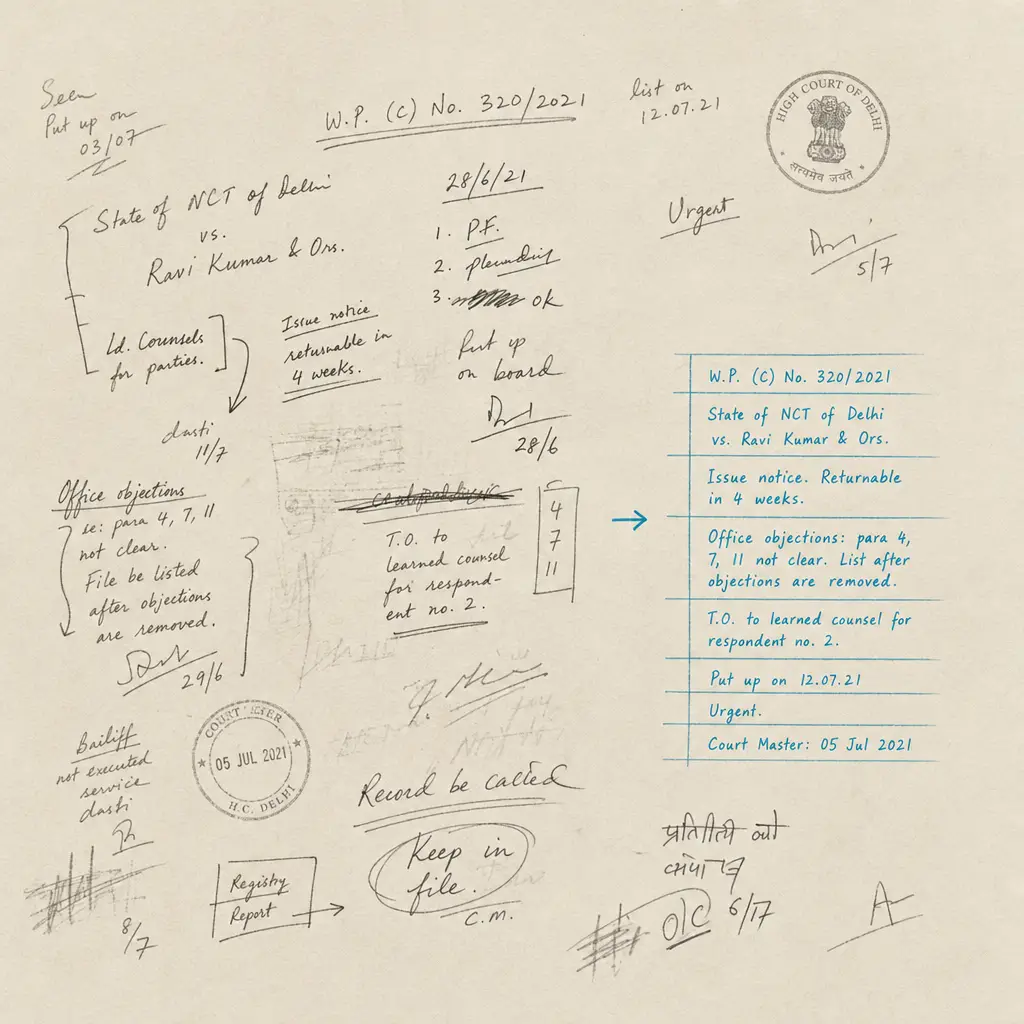
Court annotations capture judicial thinking that shapes case outcomes. A judge’s handwritten note on a motion might reveal preliminary views on legal arguments. Court clerk annotations document procedural actions that affect deadlines and case progression. Opposing counsel notes added during hearings become part of the formal record and can indicate litigation strategy.
These handwritten annotations contain information critical to understanding how courts view your case. But they remain locked in image form. You cannot search court files for judicial annotations mentioning specific legal issues. You cannot locate all instances where a particular judge made handwritten notes on similar motions. When appellate attorneys need to reconstruct procedural history from handwritten clerk entries, they face manual page-by-page review of physical court files.
This page explains how handwriting OCR makes court annotations searchable. It addresses what types of court handwriting it processes, how litigation teams use it for appellate work and judicial research, and realistic expectations when working with formal court documents.
Why Court Annotations Matter in Litigation
Court proceedings generate handwritten annotations that become part of the official record. Understanding these annotations provides strategic advantages, but accessing them efficiently requires making handwritten content searchable.
Judicial Notes Reveal Preliminary Thinking
Judges frequently make handwritten notes on pleadings and motions during their initial review. These annotations might include preliminary views on legal arguments, questions about facts that need clarification, or observations about procedural issues. While not formal rulings, judicial marginalia provides insight into how the court perceives your arguments.
Attorneys who have access to searchable judicial annotations can analyze patterns in how particular judges respond to specific legal issues. If a judge consistently makes handwritten notes questioning certain types of evidence or legal theories, that pattern informs motion drafting strategy for future cases. Without searchability, this pattern recognition requires manually reviewing physical court files across multiple matters.
In appellate contexts, understanding what a trial judge noted on key pleadings helps frame error arguments. If handwritten judicial notes on a motion reveal misunderstanding of a legal standard, that becomes relevant to appellate briefing. Making these annotations searchable means appellate teams can locate them efficiently rather than manually reviewing entire court files.
Judicial handwritten notes on motions often indicate preliminary views on legal arguments before formal rulings are issued.
Procedural History Lives in Handwritten Entries
Court clerks maintain case files with handwritten administrative entries documenting procedural actions. Filing dates, service confirmations, deadline extensions, and administrative corrections often appear as handwritten annotations in court files. These entries constitute the formal procedural record, but they are not always captured in electronic docket systems.
For complex litigation with extensive procedural histories, reconstructing the timeline of court actions requires reviewing these handwritten clerk entries. Appellate work particularly depends on accurate procedural chronologies. If a critical motion was filed on a specific date that affects jurisdictional questions, confirming that date might require locating a handwritten clerk entry in a physical court file.
Making court clerk annotations searchable means legal teams can locate procedural entries by date, document type, or administrative action. This accelerates procedural verification and ensures compliance with court requirements based on formal file entries rather than potentially incomplete electronic records.
Opposing Counsel Annotations During Proceedings
Court proceedings generate handwritten annotations by opposing counsel that become part of the record. During hearings, attorneys make handwritten notes on exhibits or pleadings. In depositions, counsel annotates witness testimony transcripts. At trial, handwritten marks on exhibits indicate objections or emphasis points raised during examination.
These opposing counsel annotations provide insight into litigation strategy. Patterns in what opposing counsel highlights or questions reveal their case theory. Notes added during proceedings show which evidence they consider important or problematic. For trial teams preparing cross-examination or rebuttal, understanding what opposing counsel emphasized through their handwritten annotations informs strategic decisions.
When these annotations remain image-locked in court files or deposition transcripts, finding them requires manual review. Making them searchable allows litigation teams to quickly locate all instances where opposing counsel annotated specific issues, witnesses, or evidence types across extensive court records.
The Challenge of Unsearchable Court Annotations
Modern legal research depends on searchability. Electronic docket systems, legal databases, and document management platforms enable keyword searches across vast collections of legal materials. This works well for typed court orders and electronically filed pleadings, but it fails completely when critical information exists as handwritten annotations in court files.
Critical Information Locked in Image Form
Court files contain handwritten annotations that affect case outcomes, but standard technology cannot search them. If a judge wrote “lacks personal jurisdiction” in the margin of a motion, that observation is invisible to keyword searches. When court clerks handwrite procedural notes that correct docket errors, those corrections do not appear in electronic docket searches.
This creates practical problems. Appellate attorneys researching how trial judges ruled on similar motions cannot search for handwritten judicial notes across multiple cases. Litigation teams verifying procedural compliance cannot efficiently locate handwritten clerk entries documenting specific administrative actions. Trial attorneys analyzing opposing counsel’s case strategy cannot search for patterns in their handwritten annotations across depositions and hearings.
Legal professionals report spending substantial time manually reviewing court files specifically to find handwritten annotations that might contain case-critical information. During appellate deadlines or trial preparation under time pressure, this manual review becomes a significant bottleneck.
Appellate Work Requires Procedural Reconstruction
Appellate litigation depends on accurate procedural records. Establishing that a motion was filed on a specific date, that service was completed within required timeframes, or that court orders were entered following proper procedure often requires locating handwritten entries in trial court files.
Electronic docket systems provide summaries, but the official record frequently lives in handwritten clerk annotations on physical court documents. When appellate issues turn on procedural questions, attorneys must review these handwritten entries to confirm facts. If the handwriting is not searchable, this means manually paging through trial court files to locate relevant procedural notations.
For cases with extensive procedural histories, this manual review can involve thousands of pages of court documents. Appellate teams describe the time-consuming process of reviewing entire court files to find handwritten clerk entries documenting specific procedural events. This inefficiency compounds when working under appellate filing deadlines.
Appellate attorneys often spend hours manually reviewing court files to locate handwritten clerk entries that document critical procedural events.
Pattern Analysis Across Cases Becomes Manual Work
Litigation strategy benefits from understanding judicial patterns. How does a particular judge typically rule on summary judgment motions in similar cases? What types of evidence does this judge question in handwritten notes on admissibility motions? What procedural issues does this judge raise in marginalia on pretrial orders?
Answering these questions requires analyzing judicial behavior across multiple cases. If handwritten judicial annotations were searchable, attorneys could search court files for patterns in how specific judges annotate similar motions. This pattern recognition would inform motion drafting and case strategy.
Without searchability, judicial pattern analysis requires manually reviewing physical court files case by case. This is time-intensive work that most litigation teams cannot justify. As a result, valuable insights from judicial handwritten annotations remain inaccessible despite being part of public court records.
What Handwriting OCR Processes in Court Documents
Handwriting recognition technology processes the specific types of court annotations that legal teams encounter in litigation practice. Understanding what it handles effectively helps determine whether it addresses real inefficiencies in your workflow.
Judicial Annotations on Pleadings and Motions
Judges make handwritten notes on legal pleadings during their review process. These annotations range from neat marginalia written during chambers review to more rushed notes made during hearings. The handwriting quality varies depending on the individual judge and the context in which notes were added.
Handwriting OCR processes these judicial annotations regardless of whether they were written carefully or hastily. It recognizes both print and cursive handwriting that different judges use. It handles notes written in margins where space is limited, as well as longer observations written on separate annotation pages attached to pleadings.
This means judicial notes like “lacks standing,” “see controlling precedent,” or “credibility issue with witness testimony” become searchable text. Legal teams can locate all motions where a judge questioned standing arguments, or find pleadings where the judge noted credibility concerns. This enables strategic analysis of judicial thinking that was previously inaccessible.
Court Clerk File Entries
Court clerks maintain official case files with handwritten administrative entries. These annotations document filing dates using date stamps with handwritten components, record service confirmations, note deadline extensions, and correct docket errors. Clerk handwriting typically follows more standardized formats than judicial annotations, but varies across different court systems and individual clerks.
The technology processes these clerk annotations including date entries, administrative notes, and procedural confirmations. It recognizes standard legal abbreviations that clerks commonly use. It handles forms where clerks fill in handwritten information alongside printed text.
Making clerk entries searchable allows legal teams to verify procedural facts by searching court files for specific dates, document types, or administrative actions. This is particularly valuable when electronic docket entries are incomplete or when confirming official file entries for appellate purposes.
In-Court Annotations by Parties
Court proceedings generate handwritten annotations that become part of the formal record. Attorneys mark exhibits during hearings and trial. Court reporters or clerks add handwritten corrections to transcripts. Witnesses make handwritten changes to deposition testimony. These in-court annotations capture information that affects evidentiary value and litigation strategy.
Handwriting OCR processes these procedural annotations including exhibit markings, transcript corrections, and hearing notes that enter the court record. It handles annotations made under the time pressure of active proceedings, recognizing that in-court handwriting may be less neat than deliberate office annotations.
This capability means litigation teams can search court records for patterns in opposing counsel’s exhibit annotations, locate all witness corrections to testimony, or find instances where court personnel noted specific procedural events during hearings. Information that was locked in handwritten form becomes accessible through keyword searches.
| Court Document Type | Annotation Source | Typical Content | Searchability Benefit |
|---|---|---|---|
| Pleadings and motions | Judge | Legal observations, preliminary views, questions | Pattern analysis of judicial thinking |
| Case file documents | Court clerk | Filing dates, service confirmations, administrative notes | Procedural verification and appellate record review |
| Exhibits | Opposing counsel | Emphasis marks, objections, strategic notes | Understanding litigation strategy |
| Transcripts | Witnesses/court staff | Corrections, clarifications, procedural notes | Locating testimony changes and procedural events |
| Court orders | Judge | Handwritten amendments, additional instructions | Finding modified court directives |
How Litigation Teams Use Court Annotation OCR
Making court annotations searchable addresses specific bottlenecks in litigation practice. Legal teams apply this capability to appellate work, judicial research, procedural verification, and strategic analysis.
Appellate Practice and Record Review
Appellate attorneys reconstruct trial court records to identify errors and build appellate arguments. This requires reviewing handwritten entries in court files that document procedural events, judicial observations, and administrative actions. When these handwritten annotations are searchable, appellate teams can locate relevant entries efficiently rather than manually reviewing entire trial court files.
Appellate lawyers describe searching processed court files for handwritten judicial notes on key motions to understand the trial court’s reasoning. They locate handwritten clerk entries documenting specific procedural events by searching for dates or document types. They find handwritten corrections to transcripts that affect the appellate record.
This search capability accelerates record review during appellate preparation. Instead of spending days manually reviewing court files to find procedural entries or judicial annotations, appellate teams search directly for relevant handwritten content. This is particularly valuable when working under appellate filing deadlines.
Understanding how handwriting OCR processes these materials is essential for appellate work. The parent guide on litigation and discovery handwriting OCR provides broader context on handling legal handwritten materials.
Searchable court annotations enable appellate attorneys to locate trial judge notes and clerk entries in hours rather than days of manual file review.
Motion Strategy Based on Judicial Patterns
Litigation strategy improves when attorneys understand how particular judges typically respond to specific legal arguments. If a judge consistently makes handwritten notes questioning certain types of evidence or legal theories across multiple cases, that pattern informs how to frame arguments in future motions before the same judge.
With searchable judicial annotations, litigation teams can analyze patterns in handwritten judicial notes across multiple court files. They search for instances where a judge annotated motions addressing similar legal issues. They identify recurring concerns or observations in judicial marginalia that indicate the judge’s analytical approach.
Legal professionals report that this pattern analysis improves motion drafting. By understanding what issues a judge raises in handwritten notes on similar motions, they can address those concerns proactively in new filings. This is practical judicial research that was previously impractical due to the manual effort required to review handwritten annotations across multiple physical court files.
Procedural Compliance Verification
Court procedural requirements depend on official court file entries. Verifying that documents were filed on specific dates, that service was completed properly, or that deadlines were extended as claimed often requires confirming handwritten clerk annotations in court files.
Making these handwritten clerk entries searchable allows legal teams to verify procedural facts efficiently. They search court files for handwritten date entries, service confirmations, or administrative notes documenting specific procedural events. This is faster and more reliable than relying solely on electronic docket summaries that might be incomplete.
Litigation teams describe using searchable court file annotations to catch procedural discrepancies. Opposing counsel might claim a document was filed on a date that differs from the handwritten clerk entry in the official court file. Being able to search for and locate the actual handwritten entry resolves these disputes definitively.
Discovery of Strategic Annotations
Opposing counsel’s handwritten annotations during court proceedings reveal their litigation strategy. What they emphasize in handwritten notes on exhibits, which testimony they highlight in transcript annotations, and what procedural objections they note in hearing materials all indicate what they consider important to their case.
When these opposing counsel annotations are searchable, litigation teams can analyze strategic patterns. They search for all instances where opposing counsel annotated specific issues across depositions, hearings, and trial exhibits. They identify which witnesses or evidence types received the most handwritten emphasis.
This strategic intelligence informs case preparation. Understanding what opposing counsel emphasized through handwritten annotations helps trial teams anticipate arguments and prepare responses. It provides insight that was inaccessible when handwritten annotations remained image-locked in court records.
Realistic Expectations for Court Materials
Court annotations vary in handwriting quality, legal terminology, and context. Understanding what handwriting OCR handles well and what requires additional review helps set appropriate expectations for litigation use.
What Works Well
Deliberate judicial annotations written during chambers review are typically processed with high accuracy. These notes tend to use standard legal terminology and are written with enough care to be legible. Judges writing observations for their own later reference generally produce handwriting that OCR technology handles effectively.
Standard court clerk entries follow consistent formats across similar administrative actions. Clerks recording filing dates, service confirmations, or docket corrections use familiar legal abbreviations and standardized phrasing. This consistency helps handwriting recognition perform reliably on clerk annotations.
Formal court annotations made for the official record are generally written with care. When attorneys, court reporters, or judicial staff add handwritten notes knowing they become part of formal court files, the handwriting quality tends to support accurate OCR processing.
What Requires Extra Review
Heavily abbreviated legal shorthand needs contextual verification. Judges and court clerks use abbreviations specific to their jurisdiction or practice area. While the handwriting might be recognized accurately as text, understanding what “SOJ” or “MTD w/o prej” means requires legal knowledge. The technology converts handwriting to text, but legal professionals interpret the abbreviations.
Jurisdiction-specific conventions vary across court systems. What clerks write to document continuances in federal court might differ from state court practices. Judicial annotation styles vary by individual judge. While OCR processes the handwriting itself, verifying that interpretations align with local court conventions requires familiarity with the jurisdiction.
Rushed in-court notes present typical handwriting challenges. Annotations made during fast-paced hearings or trial may be less legible than deliberate marginalia. Very small margin notes on crowded pleadings might be harder to process than notes with adequate space. These materials still benefit from OCR processing, but the output requires more careful verification.
Maintaining Legal Context
Handwriting OCR converts court annotations to searchable text, but legal meaning depends on context. A judicial note saying “review standard unclear” has different implications depending on whether it appears on a summary judgment motion versus a motion to dismiss. The technology makes the annotation searchable, but attorneys apply legal analysis to interpret significance.
Court annotations frequently reference case law, procedural rules, or prior court actions using shorthand that assumes legal knowledge. Making these references searchable is valuable, but understanding what they mean and how they affect case strategy requires professional legal judgment.
The goal is not to replace legal analysis of court annotations. The goal is to make handwritten court annotations as searchable as typed court documents, so attorneys can efficiently locate relevant handwritten content and apply their legal expertise to interpreting it.
Privacy and Court Record Confidentiality
Court materials include both public records and confidential documents. Discovery materials may be sealed by court order. Work product annotations on court files are privileged. Internal case notes referencing court proceedings contain client confidential information. Any technology processing these materials must respect legal confidentiality obligations.
How Document Privacy Works
When you process court materials through handwriting OCR, documents are handled only to deliver results to you. They are not used to train AI models. They are not retained longer than necessary to complete processing. They are not shared with third parties or made accessible to other users.
This matters for legal professionals who have ethical duties regarding confidential information. Court documents filed under seal, attorney notes on court filings, and internal case materials referencing court proceedings all require confidential handling. The service maintains these protections throughout processing.
Your court documents remain under your control. You upload materials for processing, receive searchable text output, and maintain custody of both originals and processed results. The service provider does not claim rights to your documents, does not access them for purposes other than OCR processing, and does not retain them in ways that compromise confidentiality.
Compliance with Professional Obligations
Attorneys have ethical obligations regarding client confidentiality, work product protection, and court-ordered sealing. Using third-party services to process legal materials does not eliminate these obligations. The service structure supports compliance with professional requirements rather than creating conflicts.
Documents filed under seal or subject to confidentiality orders are processed with the same privacy protections as any other materials. The service does not distinguish document types or make determinations about confidentiality status. All materials receive baseline privacy protections appropriate for sensitive legal content.
Legal professionals maintain responsibility for determining what materials they can appropriately process through third-party services under applicable rules and court orders. The service provides the infrastructure to handle materials confidentially, but attorneys make professional judgments about use.
Security During Processing
Court materials are transmitted and processed using standard security protocols. Documents are encrypted during transmission. Processing occurs in secure environments where access is limited to systems necessary for completing OCR operations.
This infrastructure recognizes that court materials can be sensitive. Sealed documents, privileged work product, and client-confidential information require security appropriate to their nature. While no technology eliminates all risk, the architecture prioritizes security in ways suitable for professional legal use.
Getting Started with Court Materials
If you are dealing with handwritten court annotations and need to make them searchable for appellate work, judicial research, or case strategy, the most direct approach is testing with your actual court documents.
Court handwriting varies by jurisdiction and individual. Judicial annotation styles differ between judges. Court clerk practices vary across court systems. The only way to know whether handwriting OCR will improve your specific workflow is testing it on the types of court materials you actually work with.
HandwritingOCR offers a free trial with credits for processing sample documents. Upload a pleading with judicial annotations, court file pages with clerk entries, or deposition transcripts with handwritten corrections. See how the searchable output compares to manual transcription or other approaches you have tried.
Your court materials remain confidential throughout testing. Documents are processed only to deliver results to you and are not used for any other purpose. This allows legal professionals to test functionality without compromising ethical obligations regarding confidential information.
The service is straightforward to use. Upload scanned court documents, process them, and download searchable text output. There is no complex setup, no software installation, and no commitment required to determine whether it works for your materials.
If it reduces time spent manually reviewing court files to locate handwritten annotations, it likely delivers similar benefits on comparable materials. If accuracy does not meet your requirements for legal use, you have learned that before investing further. Either way, you will understand more clearly whether handwriting OCR addresses practical bottlenecks in your court document workflows.
For additional context on processing other types of legal handwritten materials, see guides on handwritten discovery annotations, handwritten annotated exhibits, and handwritten witness notes. The broader context for legal handwriting appears in our guide to litigation and discovery handwriting OCR.
Frequently asked questions
Can handwriting OCR process judicial annotations on court pleadings and motions?
Yes, handwriting OCR processes judicial handwritten notes on pleadings, motions, and orders. This includes marginalia written during chambers review, observations noted during hearings, and handwritten amendments to court documents. The technology handles both neat deliberate annotations and more rushed notes, recognizing print and cursive handwriting styles that different judges use. This makes judicial annotations searchable so legal teams can locate specific observations across multiple court files.
How does handwriting OCR help with appellate work that requires reviewing trial court records?
Appellate attorneys need to locate handwritten court file entries, judicial notes, and procedural annotations when reconstructing trial court records. By converting these handwritten annotations to searchable text, appellate teams can search court files for specific dates, procedural events, or judicial observations rather than manually reviewing entire trial court files page by page. This accelerates record review during appellate preparation, particularly when working under filing deadlines.
Are court documents kept confidential when processed through handwriting OCR?
Yes, court materials are processed only to deliver results to you and are not used to train AI models, shared with third parties, or retained longer than necessary. This applies to all court documents including sealed materials, privileged work product, and confidential case files. Legal professionals can process court materials while maintaining compliance with ethical obligations regarding confidentiality and court-ordered protections.
Can handwriting OCR recognize court clerk handwritten entries that use legal abbreviations?
Yes, the technology processes court clerk handwriting including standard legal abbreviations commonly used in court file entries. Clerk annotations documenting filing dates, service confirmations, and procedural notes are converted to searchable text. While the handwriting itself is recognized accurately, interpreting jurisdiction-specific abbreviations or local court conventions requires legal knowledge. The OCR makes the text searchable so legal professionals can locate and interpret these entries efficiently.
What file formats work for processing court documents with handwritten annotations?
Handwriting OCR processes scanned PDFs and common image formats including JPG, PNG, and TIFF. Court files are typically scanned as PDFs, which can be uploaded directly without conversion. The output is delivered as searchable text in formats like Word (DOCX), plain text, or Markdown depending on workflow needs. There is no special preparation required, you work with scanned court documents as they exist.