
Quick Takeaways
- Handwriting OCR converts lawyer notebooks and working notes into searchable text
- Process case notes, legal research, client meeting notes, and strategy planning
- Enables keyword searching across years of handwritten legal work product
- Critical for lawyers who maintain handwritten notes but need digital accessibility
- Attorney work product remains confidential throughout processing
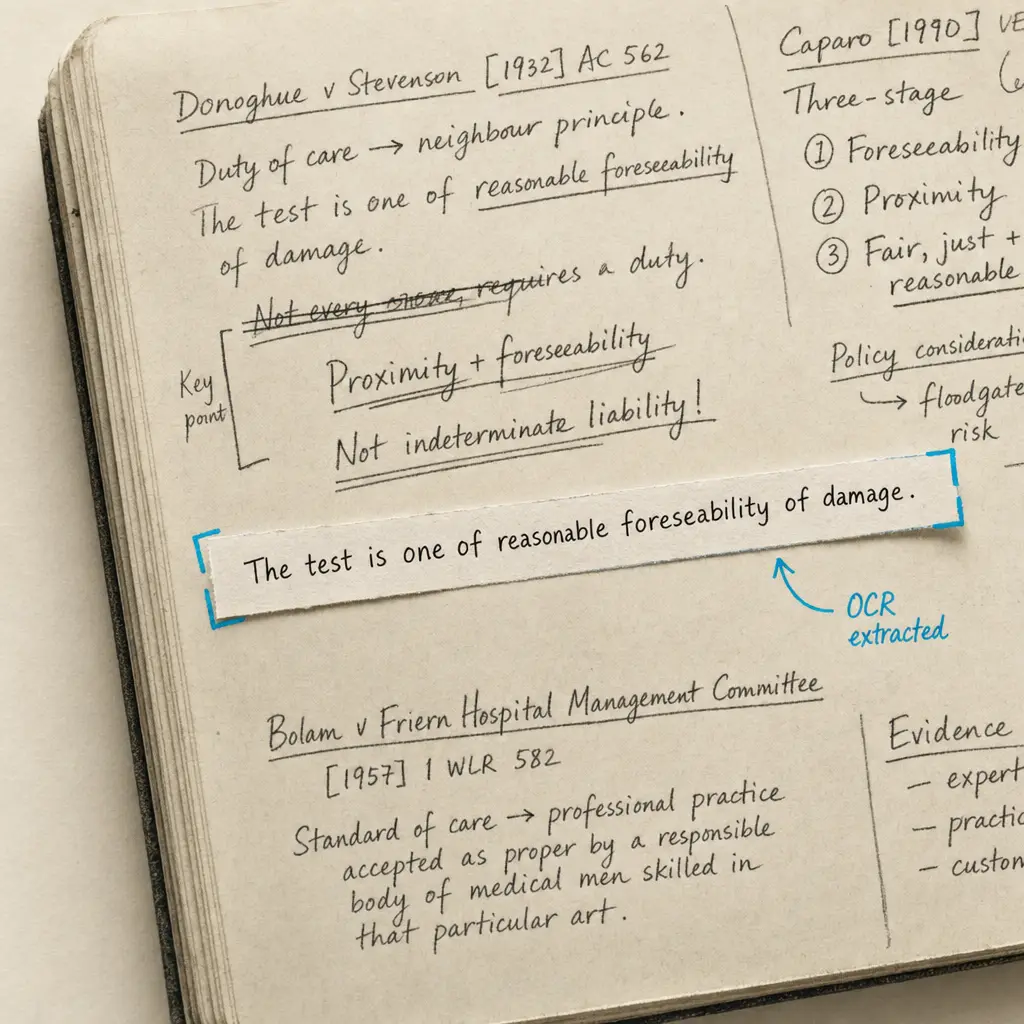
Lawyers maintain handwritten notebooks that accumulate years of work product. These notebooks contain case notes from client meetings, legal research observations, hearing notes, strategy planning, and informal documentation of legal work. Many attorneys think more clearly when writing by hand, preferring notebooks to laptops during client conversations, court proceedings, or legal analysis.
These handwritten notebooks create a practical problem. You cannot search years of handwritten notes to find observations about specific cases or legal issues. When you need to recall what a client said during a meeting months ago, it means manually paging through notebook volumes. Legal research notes that would be valuable for current cases remain inaccessible because handwritten observations cannot be searched. Work product accumulated over years stays locked in physical notebooks rather than being available for practice development or case preparation.
This page explains how handwriting OCR makes lawyer notebooks searchable and accessible. It addresses what types of handwritten legal notes it processes, how attorneys use searchable notebooks for practice management and case work, and realistic expectations when digitizing years of handwritten legal work product.
Why Lawyers Still Use Handwritten Notebooks
Despite digital note-taking tools, many attorneys maintain handwritten notebooks as core components of their practice. Understanding why helps clarify whether OCR technology addresses real professional needs.
Client Meeting Documentation
Attorneys meet with clients to discuss sensitive legal matters. Opening a laptop during these conversations can create barriers to communication. Clients may feel the attorney is distracted or that technology interferes with personal connection. Some clients become uncomfortable when they see attorneys typing during discussions of confidential matters.
Handwritten notes during client meetings feel less intrusive. Attorneys can maintain eye contact, respond to client emotions, and document important information without technology mediating the conversation. The handwriting itself demonstrates attention to what clients are saying.
These client meeting notes capture critical information about case facts, client objectives, and attorney-client communications. Making them searchable allows attorneys to quickly locate specific client statements or case details without manually reviewing notebook pages from multiple meetings.
Attorneys accumulate hundreds of pages of handwritten client meeting notes annually, creating work product that remains unsearchable without digitization.
Court and Hearing Notes
Many courtrooms restrict laptop use or attorneys prefer handwritten notes during proceedings. Court hearings move quickly with judicial comments, opposing counsel arguments, and witness testimony requiring real-time documentation. Handwritten notes allow attorneys to capture observations without the distraction or limitations of typing.
These hearing notes document judicial reactions to arguments, opposing counsel positions, and testimony details that inform case strategy. Attorneys note which arguments the judge questioned, what evidence opposing counsel emphasized, or what testimony seemed most credible to the fact-finder.
Searchable hearing notes enable attorneys to locate observations from prior proceedings when preparing for subsequent hearings, identify patterns in how judges respond to particular legal arguments, or find notes about opposing counsel tactics across multiple cases.
Legal Research and Analysis
Attorneys conducting legal research often write observations, case connections, and strategic insights by hand. While legal databases are digital, the thinking process many attorneys use to analyze cases and develop legal theories involves handwritten notes, diagrams, and informal documentation.
Research notebooks contain observations about how cases relate to current matters, notes about legal principles that might apply to pending issues, and strategic insights about argument approaches. These research notes represent valuable work product but remain inaccessible when locked in handwritten form.
Making research notes searchable allows attorneys to locate prior analysis of similar legal issues, find case observations that apply to current matters, or access strategic insights developed during earlier research that inform current case approaches.
The Challenge of Unsearchable Legal Notebooks
Lawyer notebooks accumulate substantial work product over time. Without searchability, this accumulated knowledge remains difficult to access and utilize effectively.
Lost Institutional Knowledge
Attorneys build knowledge over years of practice. Observations from client meetings, insights from legal research, and strategic lessons from prior cases all accumulate in handwritten notebooks. This knowledge is valuable for practice development and case handling but remains inaccessible when it cannot be searched.
When attorneys need information they know they documented months or years ago, finding it requires manually reviewing notebook volumes. Many attorneys describe knowing they wrote something important but being unable to locate it because handwritten notes cannot be searched.
This lost institutional knowledge represents missed opportunities. Legal insights that could inform current cases, client observations that would help with similar matters, and research notes that apply to pending issues all exist in notebooks but remain practically inaccessible.
Inefficient Case File Recreation
Years after a case closes, questions sometimes arise requiring review of attorney notes. A client might have a related legal matter, an appellate issue might emerge, or malpractice claims might require demonstrating what the attorney knew and when.
Recreating case histories from handwritten notebooks means manually reviewing pages to locate notes about specific matters. Attorneys describe spending hours searching through notebooks to find observations about cases they handled years ago.
Attorneys report spending days manually searching handwritten notebooks to locate notes about prior cases when related legal issues arise years later.
Practice Management Limitations
Law firms benefit from institutional knowledge sharing. When one attorney handles a matter similar to cases other firm members addressed, accessing prior work product helps maintain quality and efficiency. But work product locked in individual attorney notebooks cannot be shared or searched.
This creates practice management inefficiencies. New attorneys cannot easily access insights from experienced colleagues’ notebooks. Firms cannot search across attorney work product to identify relevant precedents or successful approaches. Knowledge remains siloed in individual handwritten notebooks rather than being accessible for firm-wide benefit.
What Handwriting OCR Processes in Legal Notebooks
Handwriting recognition processes the types of notes that attorneys maintain in professional notebooks. Understanding what it handles helps determine whether it addresses practice workflow challenges.
Client Meeting and Interview Notes
Attorney notebooks contain handwritten documentation from client meetings. These notes include client statements about case facts, legal questions clients raise, attorney observations about client credibility or concerns, and documentation of advice provided.
Handwriting OCR processes these meeting notes including client names, factual details, legal issues discussed, and attorney observations. It handles both deliberate note-taking during relaxed discussions and more rushed notes during emotional client conversations.
This means client meeting notes become searchable. Attorneys can locate all notes about specific clients, find discussions of particular legal issues across multiple client meetings, or access observations about case facts documented during initial consultations.
Case Strategy and Planning Notes
Lawyers document case strategy through handwritten notes. These might include decision trees about legal approaches, observations about evidence strengths and weaknesses, notes about settlement valuations, or planning for trial preparation.
The technology processes these strategic notes including legal reasoning, tactical considerations, and case planning. It handles informal notation systems attorneys develop for tracking case elements, analyzing legal positions, or planning litigation approaches.
Searchable strategy notes enable attorneys to locate prior strategic analysis that applies to current cases, find observations about similar legal issues from past matters, or access case planning notes that inform current litigation approaches.
Legal Research Observations
Research notebooks contain handwritten observations about case law, statutory interpretation, and legal principles. Attorneys note how cases relate to their matters, identify distinguishing factors, and document legal arguments suggested by research.
Handwriting OCR processes these research observations including case names, legal citations, analytical notes, and strategic insights. It recognizes legal terminology and case citation formats while adapting to individual attorney notation styles.
This capability means research observations become accessible for future matters. Attorneys can search prior research notes for analysis of similar legal issues, locate case observations that apply to current arguments, or find research insights developed during earlier matters.
| Note Type | Typical Content | Access Challenge | Searchability Benefit |
|---|---|---|---|
| Client meetings | Facts, objectives, advice given | Cannot locate specific client statements | Search by client name, issue, or date |
| Court hearings | Judicial comments, arguments, testimony | Cannot find observations from prior proceedings | Locate judge reactions to similar arguments |
| Legal research | Case analysis, statutory interpretation | Cannot access prior analysis of same issues | Find research relevant to current matters |
| Strategy planning | Litigation approaches, settlement analysis | Cannot retrieve strategic insights from past cases | Access proven approaches for similar cases |
| Phone notes | Client calls, opposing counsel discussions | Cannot locate specific conversation details | Search by participant or topic |
How Attorneys Use Searchable Notebooks
Making lawyer notebooks searchable addresses specific bottlenecks in legal practice management and case work. Attorneys apply this capability to case preparation, practice development, and knowledge management.
Case File Development and Review
Attorneys preparing for hearings, depositions, or client meetings search their notebooks to locate prior notes about the matter. Rather than manually reviewing notebook volumes to find relevant observations, they search for case names, client identifiers, or legal issues.
This accelerates case file development. An attorney can quickly locate all notes about a particular client matter, find observations from prior court proceedings, or access strategy planning notes from earlier phases of litigation.
Legal professionals describe substantial time savings when preparing for case activities. What might require hours of manual notebook review becomes minutes of targeted searching for relevant notes.
For broader context on legal handwriting, see the parent guide on legal notes handwriting OCR.
Searchable lawyer notebooks enable attorneys to locate case notes in minutes rather than hours of manual page-by-page review through notebook volumes.
Practice Area Knowledge Management
Attorneys develop expertise through accumulated experience. Observations from prior cases, insights from legal research, and lessons from litigation outcomes all contribute to professional knowledge. When this knowledge exists in searchable form, it becomes accessible for practice development.
With searchable notebooks, attorneys can locate prior work on similar legal issues, find successful approaches from past cases, or access research observations that apply to current matters. This transforms individual notebooks into searchable knowledge repositories.
Law firms use searchable attorney notebooks to enable knowledge sharing. Partners can access associate research notes, experienced attorneys can share insights with newer colleagues, and practice groups can search across attorney work product for relevant precedents.
Client Service and Responsiveness
Clients ask questions about prior advice, earlier case discussions, or historical matter handling. Responding accurately requires locating notes from potentially years-old meetings or case work.
Searchable notebooks enable prompt client service. Attorneys can quickly find notes from prior client meetings, locate documentation of advice given, or access observations about case handling that inform client questions.
This responsiveness strengthens client relationships. Rather than telling clients they need time to review old files, attorneys can search notebooks to provide informed responses during conversations.
Malpractice Defense and Professional Responsibility
Attorneys sometimes need to demonstrate what they knew, what advice they provided, or what actions they took on client matters. Contemporary notes from attorney notebooks provide critical evidence for malpractice defense or professional responsibility proceedings.
Searchable notebooks enable attorneys to quickly locate notes demonstrating case handling, advice provided, or client communications. This is particularly valuable when questions arise years after matters close and memory fades.
The ability to search notebooks for specific matters, dates, or legal issues provides efficient access to evidence of professional conduct and attorney-client interactions.
Realistic Expectations for Attorney Notebooks
Lawyer handwriting varies in legibility, consistency, and style. Notebooks span years with changing handwriting and notation systems. Understanding what handwriting OCR handles well and what requires attention helps set appropriate expectations.
What Works Well
Deliberate note-taking during client meetings or research sessions produces clear handwriting that OCR processes reliably. When attorneys have time to write carefully and form letters clearly, the resulting notes support accurate text conversion.
Standard legal terminology and common case-related language are recognized effectively. Terms attorneys use frequently, client names, legal concepts, and standard notation patterns process consistently even with moderate handwriting variation.
Organized notebooks with dated entries and clear section divisions work well. When attorneys maintain structured notebooks with dates, matter identifiers, or topic headings, the organization supports accurate processing.
What Requires Attention
Rushed notes during court proceedings or fast-paced meetings may be less legible. When attorneys write quickly to keep pace with conversations or hearings, handwriting quality varies. These notes still benefit from OCR processing, but output may require more verification.
Personal abbreviation systems and informal notation need interpretation. Many attorneys develop personal shorthand for frequent terms, create symbol systems for case tracking, or use abbreviations unique to their practice. While OCR converts handwriting to text, interpreting personal notation requires professional context.
Older notebook volumes may have degraded pages or faded ink. Notebooks maintained for years might show physical wear. Very old notes might have ink fading or page damage. These materials still benefit from digitization before further deterioration, but output quality depends on source condition.
Maintaining Work Product Integrity
Lawyer notebooks contain attorney work product protected from disclosure. Making notebooks searchable does not waive work product protection. The processing serves the same function as organizing physical notebooks or creating indexes, which attorneys routinely do without waiving privilege.
Attorneys maintain professional responsibility for protecting work product. The service provides infrastructure to process notebooks confidentially, but attorneys make determinations about appropriate use under work product doctrine and applicable ethical rules.
Privacy and Work Product Protection
Lawyer notebooks contain attorney work product, client confidential information, and litigation strategy. These materials are protected by attorney-client privilege and work product doctrine.
How Confidentiality Works
When you process lawyer notebooks through handwriting OCR, materials are handled only to deliver results to you. They are not used to train AI models. They are not retained longer than necessary for processing. They are not shared with third parties or made accessible to other users.
This matters for notebooks that contain attorney work product and client confidential information protected by ethical rules and evidentiary privileges. The service maintains protections appropriate for confidential legal materials throughout processing.
Your notebooks remain under your control. You upload handwritten notes, receive searchable text output, and maintain custody of both originals and processed results. The service does not claim rights to your work product or access it for purposes other than OCR processing.
Professional Responsibility Obligations
Attorneys have ethical obligations regarding client confidentiality and work product protection. Using OCR services to digitize notebooks does not eliminate these obligations.
The service provides infrastructure to handle legal materials confidentially, but attorneys make professional judgments about appropriate use under applicable ethical rules, privilege doctrines, and professional responsibility standards. Attorney work product remains subject to the same protections whether in handwritten or digitized form.
Security for Legal Work Product
Lawyer notebooks are transmitted and processed using security protocols appropriate for confidential legal materials. Documents are encrypted during transmission. Processing occurs in secure environments with access limited to systems necessary for OCR operations.
This infrastructure recognizes that attorney notebooks contain sensitive information requiring appropriate security. While no technology eliminates all risk, the architecture prioritizes security suitable for professional legal use with protected work product.
Getting Started with Lawyer Notebooks
If you maintain handwritten notebooks and need to make years of legal work product searchable, the most direct approach is testing with your actual notebook pages.
Attorney handwriting varies individually and changes over years of practice. Notation systems evolve, abbreviations develop, and writing styles shift. The only way to know whether handwriting OCR will work with your specific notebooks is testing it on actual pages from your practice.
HandwritingOCR offers a free trial with credits for processing sample documents. Upload pages from your notebooks with client meeting notes, legal research observations, or case strategy planning. See how the searchable output compares to your original handwritten notes.
Your notebook pages remain confidential throughout testing. Documents are processed only to deliver results to you and are not used for any other purpose. This allows attorneys to test functionality while maintaining compliance with ethical obligations regarding client confidentiality and work product protection.
The service is straightforward to use. Upload scanned notebook pages, process them, and download searchable text output. There is no complex setup, no software installation, and no commitment required to determine whether it works for your materials.
If it makes years of work product searchable and enables you to locate specific notes efficiently, it likely delivers similar benefits on additional notebook volumes. If handwriting recognition accuracy does not meet your needs, you have learned that before investing further. Either way, you will understand whether handwriting OCR addresses practical challenges in managing your legal work product.
For additional context on processing other types of legal handwritten materials, see guides on handwritten client interview notes, handwritten legal meeting notes, and handwritten case strategy notes. The broader context for legal handwriting appears in our guide to legal notes handwriting OCR.
Frequently asked questions
Can handwriting OCR process years of accumulated lawyer notebooks with varying handwriting?
Yes, handwriting OCR processes notebooks accumulated over years even when handwriting changes over time. The technology adapts to individual handwriting styles and handles variation in how attorneys wrote at different career stages. While older notebooks may have image quality challenges from aging or wear, most attorney notebooks from recent decades can be processed to create searchable archives of legal work product.
How does searchable notebook content help with case preparation?
Searchable notebooks allow attorneys to quickly locate prior notes about specific clients, cases, or legal issues without manually reviewing notebook volumes. They can search for client names to find all meeting notes, look up legal concepts to access research observations, or find case identifiers to locate strategy planning notes. This accelerates case file development and enables efficient access to work product from prior matters.
Are lawyer notebooks kept confidential when processed through handwriting OCR?
Yes, lawyer notebooks are processed only to deliver results to you and are not used to train AI models, shared with third parties, or retained longer than necessary. This protects attorney work product and client confidential information subject to ethical rules and evidentiary privileges. Attorneys can process notebooks while maintaining compliance with professional responsibility obligations regarding confidentiality and work product protection.
Can handwriting OCR recognize legal terminology and personal abbreviations attorneys use?
Yes, the technology processes standard legal terminology including case names, legal concepts, and common attorney language. Personal abbreviations and notation systems attorneys develop are converted to text, though interpreting what personal shorthand means requires professional context. The handwriting becomes searchable, allowing attorneys to locate their own notation even if the abbreviations are personal to their practice.
What file formats work for processing lawyer notebook pages?
Handwriting OCR processes scanned PDFs and image formats including JPG, PNG, and TIFF. Notebook pages can be scanned as multi-page PDFs, photographed as individual images, or captured using document scanning apps. All these formats work directly without conversion. The output is delivered as searchable text in formats like Word (DOCX) or plain text depending on workflow needs. There is no special preparation required beyond having scanned images of notebook pages.