
Pay as You Go
No commitment
£15 $15 €15 / 100 pages
One-time purchase. Valid for 1 year.
- AI-enhanced formatting
- Export to Markdown (plain text)
- Export to Microsoft Word
- Two-factor authentication
- API access
- No commitment
- Valid for 1 year
Mathpix is built for typeset math. This is built for handwriting.
Mathpix is the standard for turning typeset and screenshot equations into LaTeX. When the math is handwritten, cursive, and mixed into pages of notes, that is where Handwriting OCR takes over, and never uses your work to train its OCR.


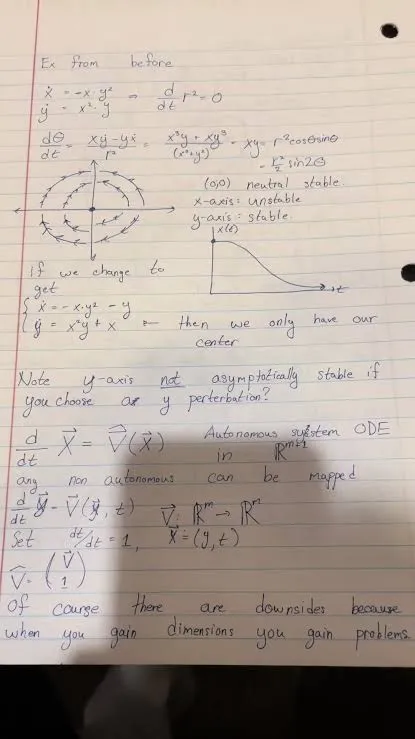
Mathpix vs Handwriting OCR
Mathpix is superb at turning printed and on-screen equations into LaTeX. Handwriting OCR is built for real handwriting: cursive equations, messy notes, and whole handwritten documents, with your work never used to train anyone's OCR.
Mathpix details from mathpix.com and its documentation, July 2026, tested via Mathpix Snip. Mathpix's privacy docs state it uses uploaded images to improve its OCR by default, with an opt-out.
Don't take our word for it
We ran one page of graduate dynamical-systems notes through Mathpix Snip and Handwriting OCR. On this one handwritten page, the two outputs differed in specific, inspectable ways. Here are the misreads, rendered exactly as each tool returned them.
Read the radius r² as Γ² (Gamma) throughout.
Broke the system-of-equations brace, so the two lines no longer group.
Turned = into −, and read ℝm → ℝm as ℝm → ℝn.
Autonomous substem ODE … ang non autonomious … of cauge there are downsides
Garbled the prose: system, any, autonomous, of course.
Autonomous system ODE … any non autonomous … Of course there are downsides
Handwriting sample from @average_joe_mcc on TikTok. The same page run through Mathpix Snip and Handwriting OCR, July 2026. Handwriting OCR kept the mathematics and prose, and even caught the writer’s struck-through “not”. This is one comparison, not a general accuracy benchmark. Try both tools on your own page before choosing.
The same page in Mathpix
For balance, here is the identical page in Mathpix Snip. Its LaTeX-native formatting is genuinely clean, that is its strength, but on this handwritten page the radius came back as Γ², the system-of-equations brace broke apart, and several words were garbled.
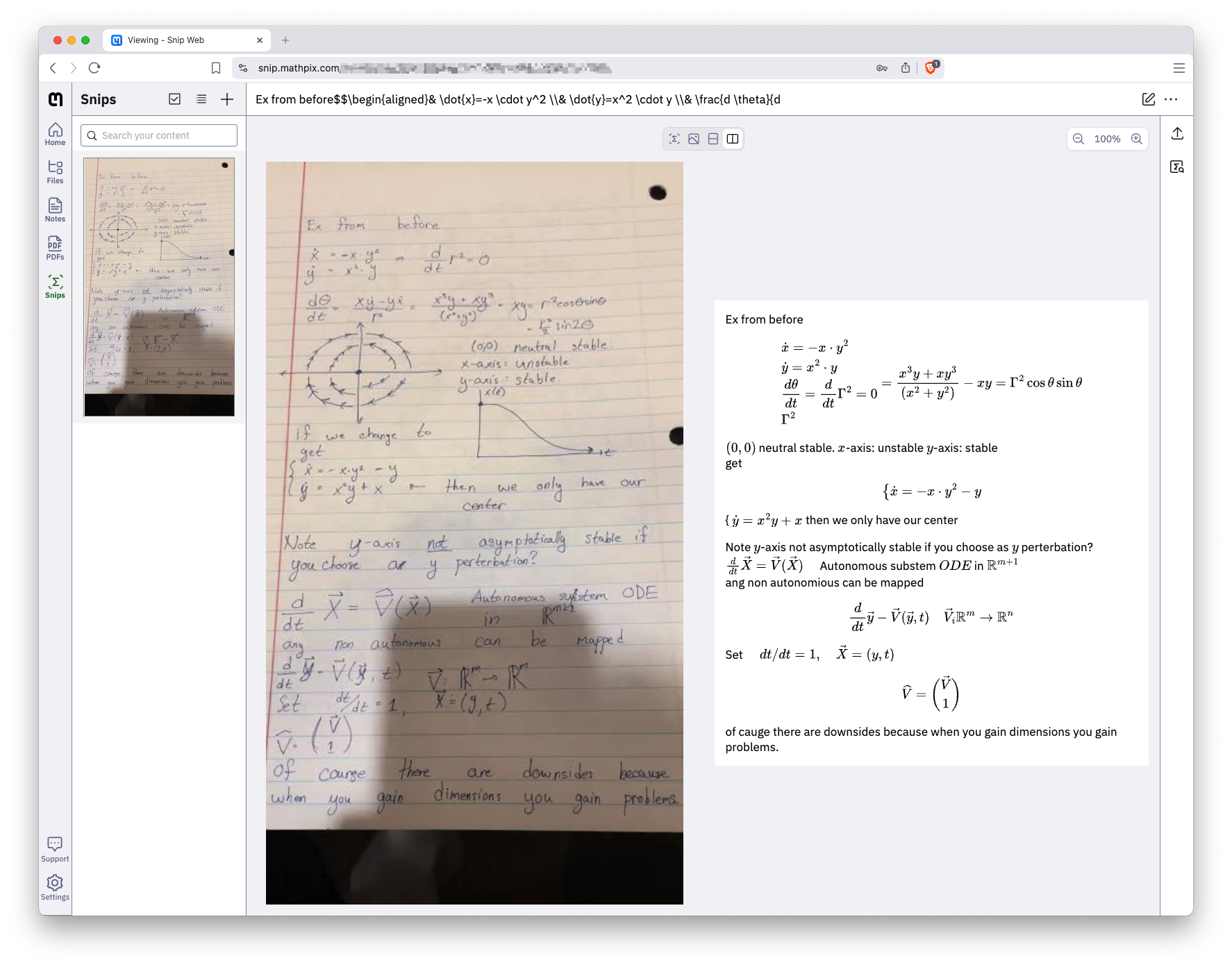 Click to enlarge
Your work stays yours
For unpublished work, this can matter more than accuracy. Mathpix’s own settings say it can use your uploaded images to improve its OCR, and that option is on by default: you opt out by unchecking it, and on the API, opting out also disables seeing your requests in your dashboard. Handwriting OCR never uses your documents to train or improve our models, on any plan, so there is nothing to switch off. Your files are encrypted, and auto-deleted after 7 days by default. For a thesis chapter, an unpublished proof, or a problem set, that is the difference between a transcription and a training sample.
Built for handwriting
Mathpix shines on typeset and screenshot math. Handwriting OCR is designed for real handwriting and returns math as LaTeX alongside the surrounding prose. The head-to-head above shows one page it handled well; results still depend on the writing and scan.
Whole documents
Snip is built around grabbing one region or equation at a time. Handwriting OCR takes a whole multi-page document of mixed math and prose, in over 300 languages, and hands back the entire page in order, ready for Overleaf, Obsidian or a document.
No math tax
Math recognition is included on every plan, including the free trial, at the same one credit per page as any other document. There is no separate math tier, no per-Snip metering, and no per-equation charge.
Being fair
Mathpix is a mature, math-first product and genuinely excellent at what it was built for. If one of these is you, it earns its place, and that's an honest answer, not a sales one.
Pricing
Pay-as-you-go credits or monthly subscriptions. Cancel any time.
No commitment
One-time purchase. Valid for 1 year.
250 pages / month
Billed monthlyBilled annually
1,000 pages / month
Billed monthlyBilled annually
10,000 pages / month
Billed monthlyBilled annually
Credits never expire while your subscription is active, and your documents are never used to train our models.
For higher volumes, dedicated instances, offline deployment, or any other custom requirements, see Handwriting OCR for Enterprise or contact us.
FAQ
Anything else? Get in touch and we'll answer right away.
For handwritten math, yes. Mathpix is excellent on typeset and screenshot equations. Handwriting OCR is built for real handwriting: cursive and messy equations, and whole handwritten documents of mixed math and prose. It returns the mathematics as LaTeX inside a Markdown transcript, on every plan.
Yes. It recognises fractions, derivatives, Greek letters, subscripts and superscripts, vectors, matrices and systems of equations, and returns them as LaTeX you can paste into Overleaf, Obsidian or a document. See the handwritten-math-to-LaTeX feature for a full example.
Mathpix's own settings state it can use your uploaded images to improve its OCR, and that option is on by default; you opt out by unchecking it (on the API, opting out also disables seeing your requests in your dashboard). Handwriting OCR never uses your documents to train or improve our models, on any plan, and auto-deletes them after 7 days by default.
All of them, including the free trial. There is no separate math tier and no per-equation charge. A page of math costs the same one credit as any other page.
When your math is typeset or on-screen rather than handwritten, when you want the Snip desktop tool for grabbing equations from a screenshot, or when you rely on its Overleaf and ChemDraw integrations. Mathpix is a mature, math-first product and excellent at that job.
Your documents are encrypted in transit, are never used to train our models, and are auto-deleted on a schedule you control (default 7 days). We do not currently offer HIPAA BAAs; for compliance questions, get in touch.
Try it on your own notes
Test your handwritten math on the page that matters.
Free trial credits, no credit card. Upload a page of your own handwritten equations and get the LaTeX back in seconds.
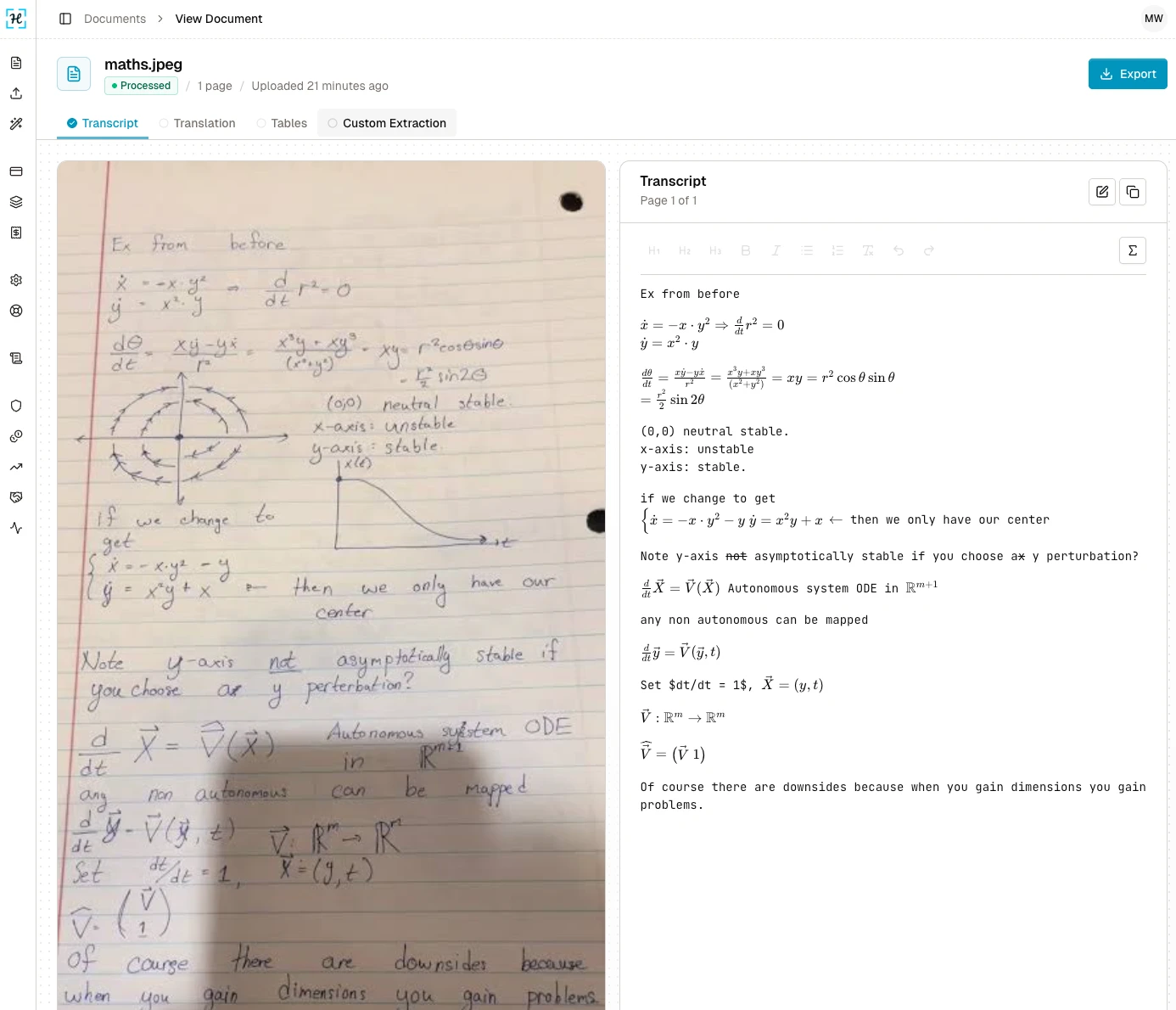
Our experience
This page is for a specific job: a notebook of handwritten lecture notes, a problem set, a proof scrawled on lined paper, where the equations are cursive and mixed into prose rather than sitting neatly on a screen.
Mathpix is genuinely excellent at typeset and screenshot math. Its Snip tool, its Overleaf and ChemDraw support, and its LaTeX-native output are why it is the standard for that job. The difficult case tested here is real handwriting. As the comparison above shows, on one messy page it misread the radius r² as Γ², broke a system of equations apart, flipped an equals sign to a minus, and garbled several words, because reading handwriting is a different problem from reading a clean equation.
Handwriting OCR is built around that gap. It is designed to read cursive and handwritten mathematics, keeps the prose alongside it, and returns the whole page as LaTeX inside a Markdown transcript. It never trains on your files, it includes math on every plan with no separate tier, and it is made by a small UK team that treats handwriting recognition as the whole product.
If you have a page of handwritten math to digitise, the fastest way to judge it is to try it free on the exact page you are stuck on.